
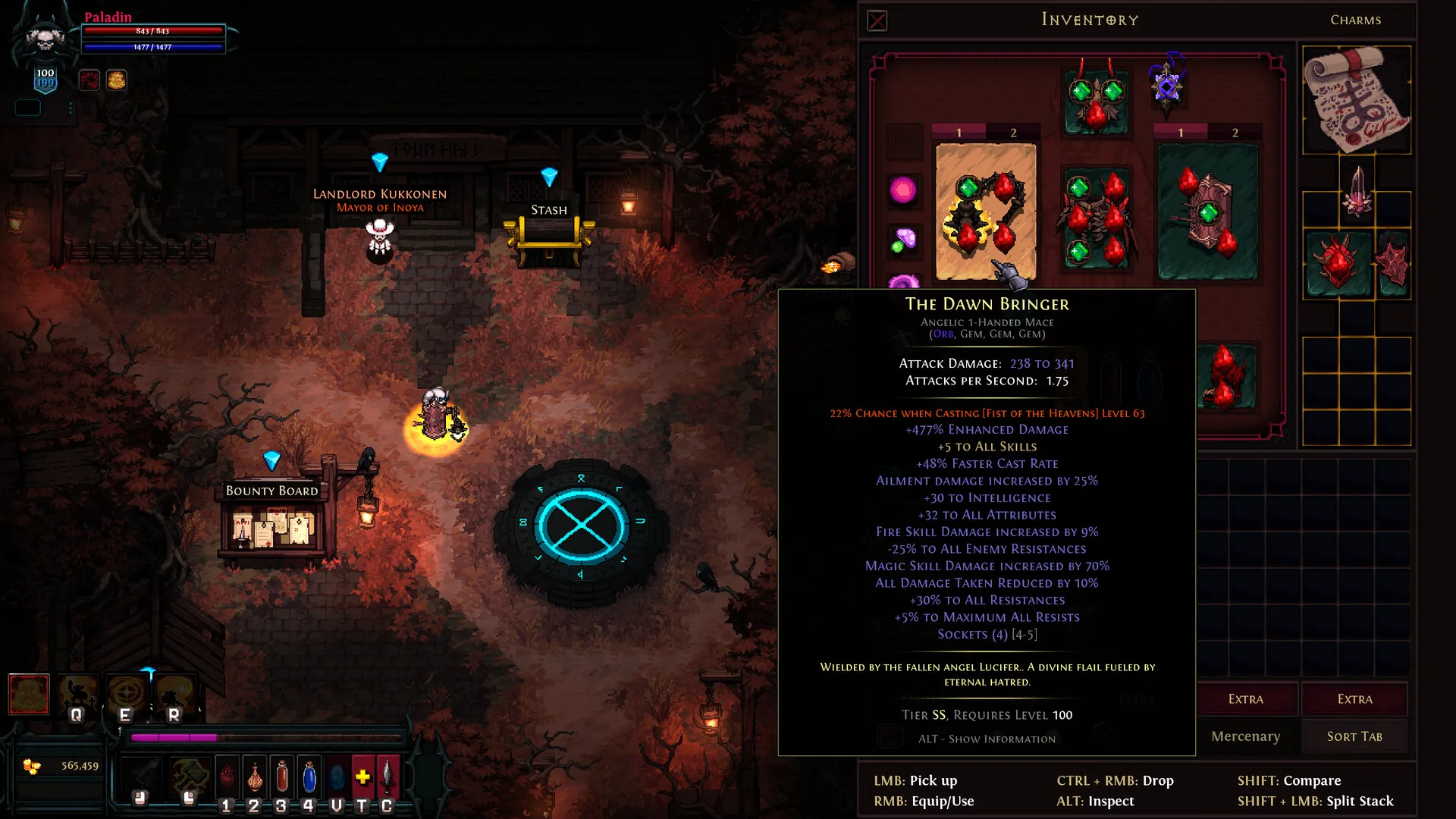
Publisher inventory screenshot: the lower-left gold balance and right-hand inventory are the fields to compare on the receiving character before and after a trade.[8]
Get both characters into the same game
In regular online play, the developer’s account-linking announcement gives linked accounts Market, Mailbox and Trading access; unlinked accounts lack those features.[2] Check access on the character you intend to use, rather than testing another character.
- Match season status and Hardcore status first. The wiki separates seasonal from non-seasonal multiplayer and Hardcore from other characters; Odyssey disables these trading features.[7]
- Have one player create a game and share its exact name. The developer documents game-name search plus region, difficulty and open/closed-room filters.[6]
- Search that game name. If it is missing, clear restrictive filters and compare the region and room settings with the host; this checks discovery before changing accounts.[6]
- Join and locate the agreed player in the lobby. Seeing a name in chat is not the same as meeting in the game where the trade will happen.
Blood Pact supports trades within the same pact and disables Market and Mailbox.[6] Use direct trade for that mode; the regular linked-account features apply to regular online characters.
Open the trade and verify the result
- Select the agreed player in the same lobby and send a trade request. The documented exchange begins after that player accepts.[3]
- Before adding anything, compare the other player’s displayed identity with the person you meant to trade with. If no trade window opens, first separate a missing request/acceptance from a missing trade option.
- Read the gold amount and inspect each offered item, then review both offers immediately before confirming. If an amount or item changes, review the new offer first.[3]
- Compare the same receiving character’s balance or inventory before and after the exchange. In the publisher screen below, the gold balance appears at the lower left; use that field for the balance comparison.[8]
In a worked balance example, 250,000 gold before a 100,000-gold handoff becomes 350,000 after it, with no other balance changes during that interval. Record both values on the same receiving character.
Choose the route that matches what is moving
| Route | Documented purpose | What to inspect | Completion to confirm |
|---|---|---|---|
| Direct trade | Gold or items in the same lobby.[3] | Recipient, gold amount and both item offers | Receiving character’s balance or inventory |
| Marketplace | Players buy and sell items.[5] | Exact item and price; current fees | Sold listing, then collected proceeds |
| Mailbox | Item messages and sold-listing gold collection.[4] | Message recipient and item attachment, or sale proceeds | Collected attachment or proceeds, then inventory/balance |
The practical difference is where your proof ends: a gold trade ends at the recipient’s balance, an item sale at the collected net proceeds, and an item message at the collected attachment. “Delivered by mail” is not enough to tell these apart.
Hero Siege’s EULA prohibits real-money trading in in-game resources, items and services and lists it as a bannable activity.[1]
If you are comparing external options for gold to fund an item purchase, use the route distinctions above to understand the proposed delivery. Match the amount, season, mode and receiving character; a route name alone does not describe the transfer.
Check current Hero Siege currency purchase optionsA Marketplace sale is not direct gold mail
To list an item, speak to Veros in the northern Village of Mos’Arathim, Act 3. To collect sold-listing gold or an item message, open the Mailbox in Inoya, Act 1.[4] [5]
- For a normal item sale, identify the exact item and asking price on the listing screen. Read the displayed fee before confirming. The wiki documents a 1% listing fee and a 10% fee when collecting gold.[5]
- Wait for the listing to sell. Posting an item has not yet generated collected proceeds.
- Open the Mailbox and inspect the proceeds from that sold listing. The documented gold collection refers to these sales.[4]
- Compare the amount offered for collection with the resulting balance. Keep listing cost and collection deduction separate so the sale price is not mistaken for profit.

The official Hero Siege Wiki distinguishes item listing from gold collection and states the 1% listing fee and 10% collection fee.[9]
For a worked 100,000-gold item sale, the documented 1% listing fee costs 1,000 gold and the 10% collection deduction leaves 90,000 to collect. The resulting balance increase across listing and collection is 89,000 gold. Keep the sale price, listing payment and net collection in three separate fields.[10]
An item attachment and sale proceeds are different
For an item message, check the recipient identifier and attached item, then collect it and verify the intended character’s inventory. Sale proceeds use the gold-collection entry in the Mailbox; item messages use their attached-item entry.[4]
If the transfer stalls, locate the unfinished step
- Game not found: compare the host’s game name and current room filters before retrying the search.[6]
- Player found but no trade option: check regular account-linking access and the character’s mode.[2] [7]
- Request sent but no window: confirm that the intended recipient saw and accepted it; sending is only the beginning of the documented flow.[3]
- Trade window opens but the expected value is missing: compare the currency and item fields before confirming anything.
- Listing exists but no proceeds: distinguish an active listing from a sold listing, then check collection.
- Message sent but nothing received: inspect the intended inbox and attachment, not the sender’s dispatch status.
Compare a specific amount and a reproducible route
Once you know the receiving character’s economy and which transfer you can inspect, compare Hero Siege currency options with that exact amount and delivery description. Gold for an item purchase, sold-item proceeds, and an item attachment should remain separate in the listing and in your completion check.
Compare current Hero Siege currency purchase optionsSources
- Hero Siege EULA (last updated 2025-02-18)
- Verified Accounts & Account Linking (2025-05-21)
- Trading — Hero Siege wiki
- Mailbox — Hero Siege wiki
- Marketplace — Hero Siege wiki
- Lobby/game list update (2025-03-10) and Blood Pact introduction (2025-03-14)
- Getting Started — Hero Siege wiki
- Publisher inventory screenshot: the lower-left gold balance and right-hand inventory are the fields to compare on the receiving character before and after a trade.
- The official Hero Siege Wiki distinguishes item listing from gold collection and states the1% listing fee and10% collection fee.
- Hero Siege official Wiki Marketplace:1% listing and10% gold collection fees