Wait unless you can confirm the exact item category, where it will arrive, how your current Expedition treats it, and whether you can use it before departure. Embark’s support page says inventory and stash items reset when a Raider departs, while cosmetics and purchased items carry over.2 However, that page does not say that a weapon, material, consumable, or blueprint delivered by another player becomes a protected “purchased item.” Treat ordinary gameplay goods as reset-exposed unless your current game screen explicitly shows otherwise.
Is your Raider actually departing?
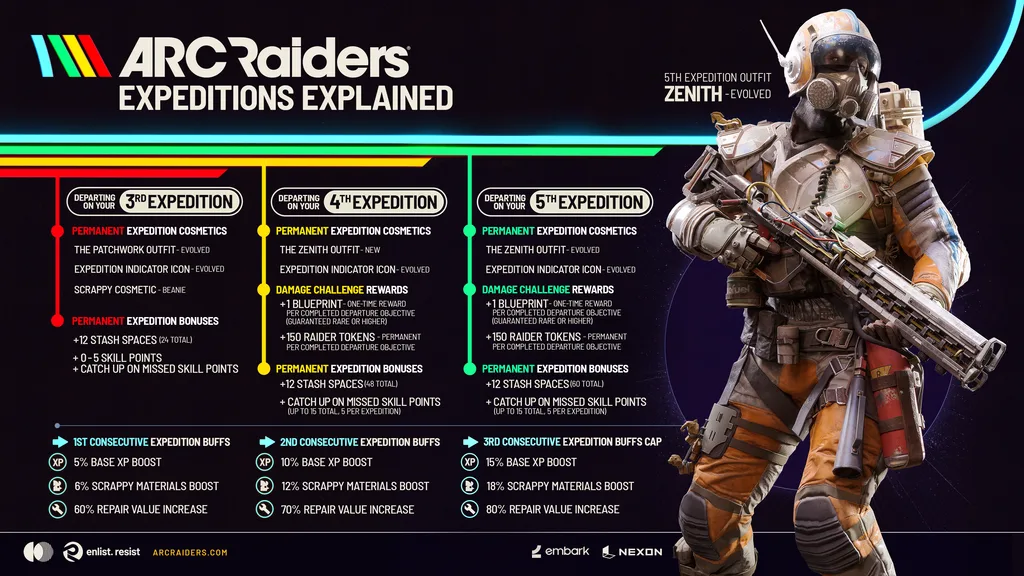
The fifth Expedition window opens on September 8, 2026 at 11:00 UTC and closes on September 29 at 08:00 UTC. Signed-up Raiders depart on September 29.1 The announcement supplies UTC, CEST, and PT times without a separate regional schedule, so the timing applies broadly; confirm the countdown shown in your own client before paying.1
Departure is not automatic merely because you completed the Caravan. Expeditions are personal progression, and you must sign up during the window; the fifth Expedition has no last-call opportunity.1 If you are not signing up, the Expedition reset is not an immediate reason to avoid an otherwise suitable item.
Which ARC Raiders items are exposed to the reset?
Classify the proposed purchase by what appears in the game after delivery—not by the listing’s marketing label. Record the item name, category, quantity, destination, and whether the game treats it as an ordinary stash item, account currency, cosmetic, or protected Vault item.
| Category | Expected destination | Official reset treatment | Expedition Vault relevance | Value before departure | What remains uncertain |
|---|---|---|---|---|---|
| Weapons, materials, and consumables | Inventory or Stash | Inventory and stash items reset when the Raider departs.2 | The official Vault page does not publish a complete category-eligibility list.3 | Only the quantity you can use, consume, trade, or contribute before departure | Whether the exact item can occupy a Vault slot |
| Blueprints | Blueprint or crafting progression | Crafting progress resets under the general support rule.2 | Embark specifically presents Blueprints as an example of something the five-slot Vault can preserve.3 | Useful if learned or used before departure, but confirm how the current screen classifies it | Whether the offered blueprint is eligible and has been placed in the Vault |
| Cosmetics and account purchases | Account or cosmetic collection | The support page lists cosmetics and purchased items as carrying over.2 | A Vault slot should not be assumed necessary when the account screen already marks the item as persistent | Potentially useful before and after departure | Whether a third-party listing delivers a genuine account purchase rather than an ordinary gameplay item |
| Raider Tokens and Cred | Account balance | Both are listed as carrying over.2 | Not described as a Vault use | Not limited to the remaining pre-departure play window | Whether the listing’s delivery method and named balance match what appears in your account |
| Quest progress | Quest log | For the fifth Expedition, players can choose not to reset quest progress.1 | Separate from item protection | Depends on whether the purchase serves the quest you intend to keep | Keeping quests does not by itself preserve related stash items |
The major drawback is that the word “purchased” is broader than the examples on the support page. The safer reading is that an ordinary gameplay item remains an inventory or stash item even if money changed hands outside the game. Do not pay on the assumption that purchase history overrides the item’s in-game category.
Can the Expedition Vault protect the item?
Ermal’s Expedition Vault provides five slots for carrying valued items across an Expedition, and Embark specifically mentions preserving relied-on Blueprints.3 The same official page does not list every accepted weapon, material, consumable, bundle, or stack type.3 Open the Vault and confirm that the exact item can be placed there before treating it as protected.
- Buy now only if the delivery destination and reset treatment are clear and the item has meaningful use before September 29.
- Reduce the quantity when only part of the order can be used before departure or protected in available Vault slots.
- Wait when the listing says only “item,” the destination is unclear, the Vault rejects the category, or the seller’s persistence claim conflicts with your game screen.
Complete these checks before comparing offers
- Open the Expedition screen and confirm whether this Raider is signed up. A completed Caravan alone is not a departure signup.1
- Capture the countdown and convert the September 29, 08:00 UTC closing time to your local time.1
- Write down the listing’s exact item, category, quantity, platform or account destination, and delivery method.
- Find the destination in your own game: Inventory, Stash, Blueprints, cosmetic collection, Raider Tokens, Cred, or another named account balance.
- If relying on the Expedition Vault, place or preview the exact category in an available slot. Do not infer eligibility from the seller’s wording.
- Compare the usable quantity with the time you expect to play before departure. Remove any surplus that would merely sit in the resetting Stash.
- Stop if the listing, delivery instructions, and game screen describe different categories or destinations.
If those checks confirm that the item will be useful before departure or visibly protected afterward, you can compare currently listed options. Otherwise, waiting avoids paying for utility that may end with this Raider.
Compare current ARC Raiders item optionsAudit the Stash before choosing a quantity
Count what you already own, including duplicates, equipped copies, crafting inputs, and items reserved for the Caravan. Inventory and stash contents are part of the progression that resets on departure.2 A large order is hard to justify when the same category already exceeds what you can use before September 29.
- Owned now: count stored, equipped, and duplicate copies separately.
- Needed before departure: count planned raids, crafts, upgrades, or Caravan contributions.
- Protected afterward: count only items visibly accepted into available Expedition Vault slots.
- Exposed surplus: subtract near-term use and confirmed protection from the total you would own after delivery.
- Replacement burden: note the actual in-game source or requirement; do not substitute a seller’s rarity claim for what your client shows.
Delivery also matters because the item must reach the intended profile before you can classify it. Readers comparing delivery channels for other game goods can use the same receipt-and-destination discipline described in the following guide.
compare digital-item delivery methods before payingA matching item sent to the wrong account, character, region, or game environment cannot provide the intended pre-reset value. The underlying destination check is illustrated in this related walkthrough.
match the account and destination shown on your screensWhat changed for the fifth Expedition?
Players may choose not to reset their quest progress during the fifth Expedition, but that choice does not change the separate support rule for inventory, stash items, and crafting progress.12 Check both settings rather than assuming that retained quests preserve their required materials or rewards.
The fifth Expedition is scheduled to be the last until early 2027 while Embark revises the system. Consecutive buffs earned before the pause will persist, while partially completed Caravans will be replaced with Ermal Vouchers of equal value.1 This makes it especially important to distinguish an item meant for your Stash from a contribution already committed to an unfinished Caravan.
Choose now, reduce the order, or wait
| Your current screen shows | Recommended decision | Reason |
|---|---|---|
| Correct destination, useful before departure, and clear reset treatment | Buy the needed quantity now | The purchase has a defined use within the remaining window |
| Correct destination but only limited pre-departure use | Choose a smaller quantity | This limits the amount left exposed in Inventory or Stash |
| Exact item is visibly accepted by an available Vault slot | Consider buying if the remaining listing details also match | Protection is based on the game screen rather than a seller promise |
| Only the seller says the item survives | Wait | The official support distinction between resetting stash goods and carrying account purchases does not classify the listing for you.2 |
| You have not signed up and do not plan to depart | Decide on normal item usefulness | The fifth Expedition reset is not triggered merely by completing the Caravan.1 |
| Category, profile, timing, or delivery destination conflicts | Do not pay yet | The proposed purchase cannot be matched to a reliable in-game outcome |
Choose only the quantity you can use before departure or visibly protect in the Expedition Vault. If either condition remains uncertain, wait until after your reset and rebuild the order around the new Raider’s actual needs.
Check current ARC Raiders item purchase options