
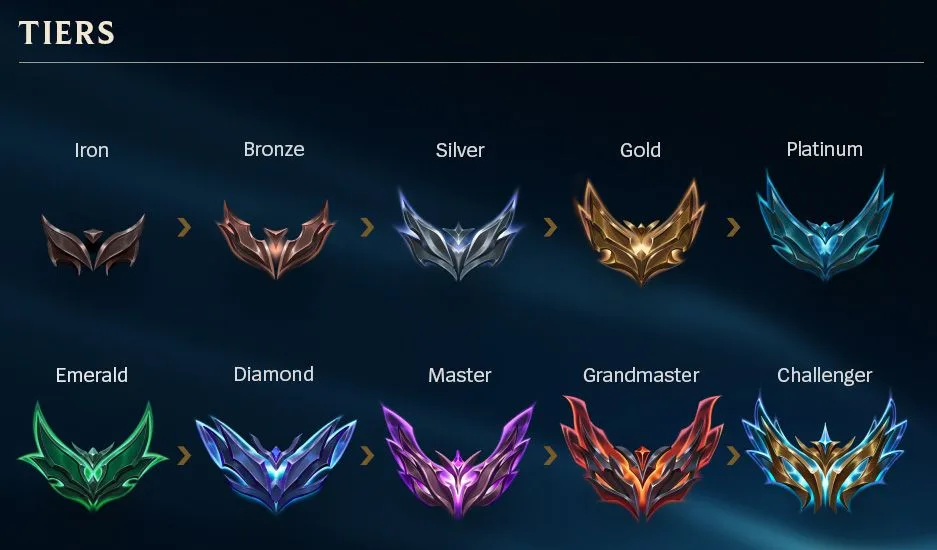
What stays and what starts again
| Account field | After a region transfer | What to do next |
|---|---|---|
| Ranked tier, division and LP | Current ranked placement does not transfer.[1] | Play new placements on the destination server. |
| Hidden MMR | Transfers, adapted to the new region.[1] | Expect seeding relative to that server’s players. |
| Friends list | Transfers.[1] | Find your friends in the social panel; confirm they play on the destination. |
| Honor level | Transfers under the current FAQ.[1] | Check the current Honor display after moving. |
| Riot ID and collection | Riot ID, champions, skins and listed collection data transfer.[1] | Check the identity and content after login. |
| Another region transfer | 90-day cooldown.[2] | Plan at least 90 days before a further move. |
The tier emblems above are Riot’s visible rank labels. They describe your displayed competitive placement, not a numerical MMR readout. The destination placement may be a different tier or division because Riot seeds you relative to players on that server.[1] [3]
Open the transfer menu before spending RP
- Open the League client Store. Click the account button beside Purchase RP.
- Select the intended destination from the account-transfer options. Read the route and any unavailable-service or eligibility message.
- Review the displayed RP cost. The current FAQ gives 2,600 RP for a one-way transfer.
- Read the confirmation before completing the move. Riot says accidental transfers cannot be reversed or refunded.
- Log into the destination, inspect your Riot ID, collection, friends and Honor, then open Ranked to begin the new placements.
Routes are not available between every pair of regions. For example, the current FAQ lists Korea among unavailable destinations for North America and EU West; Brazil and Russia are listed as unable to transfer to any shard region. The destination offered in your live client determines the route you can actually buy.[2]
The normal transfer cooldown is 90 days. Transfers can also be unavailable while the destination server is still patching. If a transfer fails, Riot asks for your current and intended server, Riot ID, account information and an error screenshot through its support ticket form.[2]
Riot’s Terms prohibit selling, sharing or transferring an account to another person. An account’s region transfer is an account service, and does not authorize a change of owner.[4]
When comparing region-labelled League account options, check the current server and placement state. A future region transfer will require new placements on the destination server.[1]
View League of Legends account region optionsWhy the old rank cannot predict the new one
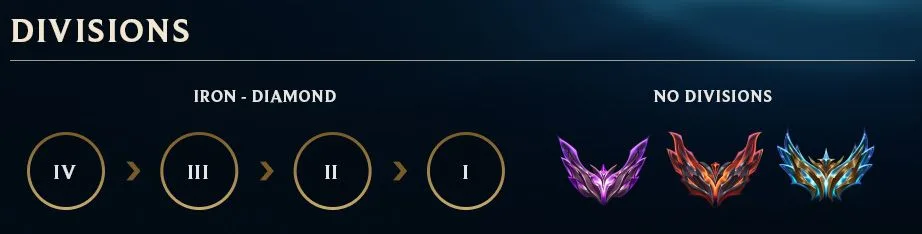
Riot’s division illustration shows IV through I within Iron–Diamond, with no divisions in the Apex tiers. After moving, complete new placements to establish your visible rank. Your MMR transfers and is adapted to the destination server, where seeding reflects the other players in that region.[1] [3]
Returning to your previous region also makes you unranked again and requires new placements.[1]
Friends and Honor move with the account
The friends list transferring means its entries remain part of the account. It does not move your friends’ own accounts onto your destination server. If playing together is the reason for the move, agree on the actual server before spending the 2,600 RP rather than merely checking whether a friend remains on your list.[1] [2]
Honor level transfers with the account. After moving, open the destination client and check the Honor display.[1]
After the transfer, check the queue you will play
Solo/Duo and Flex have independent ranks. Use the destination client’s Ranked panel for the queue you intend to play and complete its required placements. The number shown there and the resulting provisional or final rank are more useful than a screenshot from the source server.[1] [3]
For a failed move, submit the error to Riot Support with the source and destination server. For a completed move, finish new placements and check friends and Honor in the destination account. If comparing region-labelled account options afterward, compare the current region and placement state rather than a promised post-transfer rank.
View League of Legends account region options