
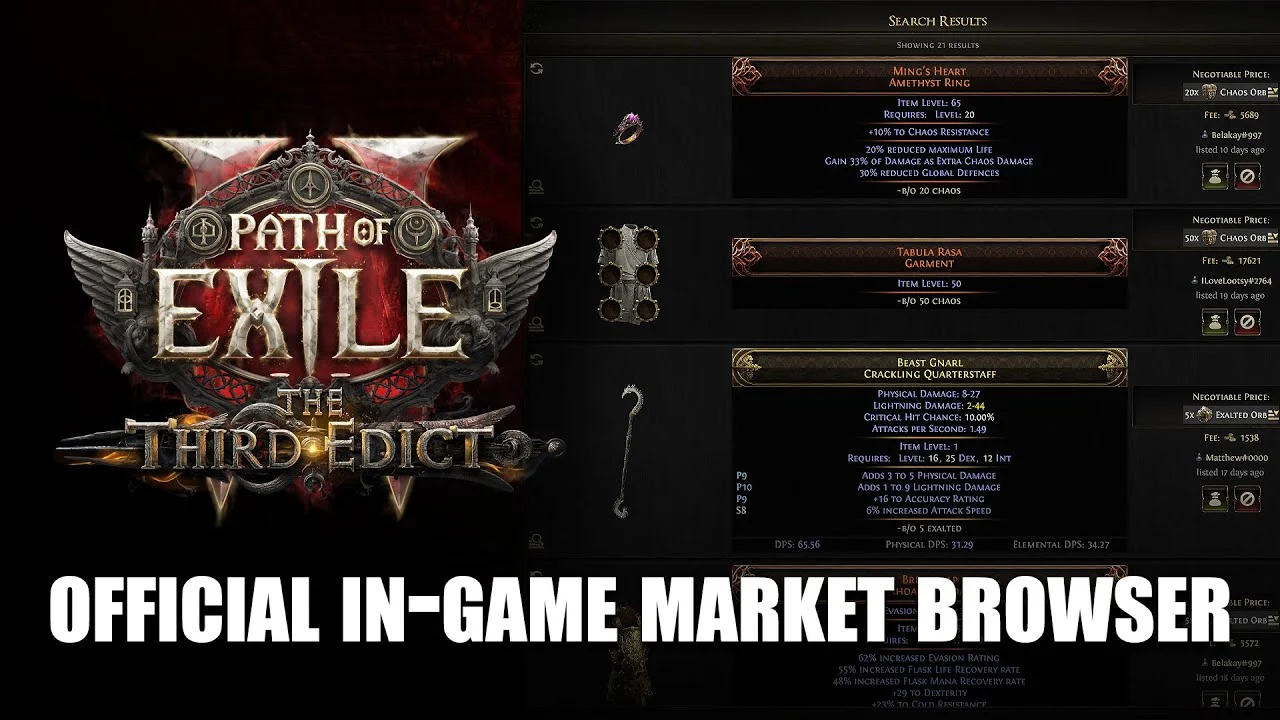
GGG’s official PoE 2 market-browser video thumbnail shows equipment search results with a currency price and a separate Fee on each listing. This is the equipment market, rather than the Currency Exchange order screen.[1]
| What you need | Use this route | What you pay or receive |
|---|---|---|
| An eligible orb or other Exchange-listed item | Currency Exchange.[1] [2] | Select the exact item types and quantities in the exchange. |
| A weapon, ring or other equipment listing | In-game market with Merchant’s Tabs.[1] | Listed currency price plus the buyer’s displayed Gold fee. |
| A traditional player handover | Existing direct trading.[1] | The agreed item and currency through the player trade. |
| Currency from equipment you sold | Ange → Manage Shop → Earnings Tab.[1] | Withdraw the sale currency before using it elsewhere. |
Choose the route from the item you are actually buying
A Merchant’s Tab cannot list the currency items handled by the Currency Exchange. Use the exchange’s item selector for an eligible orb or material; use equipment filters for a particular weapon or armour piece. Uncut Skill, Support and Reservation Gems were added to the Exchange in PoE 2’s 0.3.0 update.[1] [2]
Fill the exchange’s I have field from your inventory
- Open the Currency Exchange on a character with access. Its Act 4 unlock also enables new characters in the same league under the corrected 0.3.0b behaviour.[3]
- Ctrl + Left-click the item in your inventory to fill I have, or use the controller equivalent. This picks the item you are offering, not the item you want to receive.[2]
- Select the required output item and check its denomination against the offered item. Read both quantities and the displayed fee before committing to the exchange.

Faithful excerpt of GGG’s official 0.3.0 patch page documenting the inventory shortcut. This is patch documentation, not a recreation of the game interface.[2]
Keep ordinary, Greater and Perfect versions of an orb separate when selecting a currency type. Their names refer to different crafting items in PoE 2’s 0.3.0 item system.[2] A listing priced in a specific orb needs that denomination, rather than any item with “Orb” in its name.
Check both balances for an equipment purchase
In the official thumbnail, the pictured Ming’s Heart listing asks for 20 Chaos Orbs and shows a 5,689 Gold fee. That is a historical screenshot example, not a current offer. A character holding 20 Chaos Orbs and 5,000 Gold has the listed currency but is short 689 Gold for that example; 6,000 Gold covers the fee and leaves 311 Gold.
- Find the equipment listing and read its full tooltip: equipment type, required level, affixes and the stat values your build needs.
- Check the currency icon and amount beside the price, then check the separate Gold Fee. The Merchant’s Tab buyer pays that fee.[1]
- Complete the purchase only after those two balances and the item meet your request. If more than one player tries to buy the same copy, the first completed trade receives it.[1]
A Merchant’s Tab listing is one way to buy equipment; the older direct-trade routes still exist. You do not need to buy a Merchant’s Tab merely to use the existing player-trade method.[1]
Withdraw your equipment-sale currency

GGG’s FAQ identifies the buyer’s Gold charge and the Manage Shop → Earnings Tab withdrawal path. The image is an excerpt of that official documentation.[1]
- Return to your hideout and talk to Ange.
- Select Manage Shop, then open the Earnings Tab.
- Withdraw the currency received from sold items. The Earnings Tab is remove-only, so it cannot accept deposits back into it.[1]
Keep the sale proceeds, the currency quantity needed for your next item, and its Gold fee as three separate checks. Currency sitting in Earnings needs withdrawing before you can use it for the next purchase.
Choose currency for the exact next transaction
For a currency listing, match Path of Exile 2, your league and Softcore or Hardcore mode, then the exact orb type and quantity. For an equipment listing, first identify its stated currency price; a larger stack in a different denomination does not directly satisfy that price. Compare the amount you still need after withdrawing sale proceeds, while keeping the game’s Gold charge in your own gameplay budget.
Browse Path of Exile 2 currency options