

Match the weapon as well as the skin name
Open Collection > the weapon > Owned > the individual skin. A series name is not an itemized inventory: identify the required Vandal, melee or other weapon entry, rather than assuming that one piece confirms an entire collection.[1] [8]
Patch10.10 removed level and chroma indicators from PC weapon tiles. A visible tile therefore does not show whether every advertised upgrade is unlocked; open the detail page. Patch13.06’s new-item indicators disappear after viewing Collection or leaving the game, so they are not a permanent inventory-history record either.[2] [9]
Keep balances and progression separate
| Claim | Client screen | What to count |
|---|---|---|
| Skin | Collection > weapon > Owned > detail | Exact weapon and displayed skin name[1] |
| Levels and variants | Individual skin detail | Unlocked effects and colors[2] [3] |
| VP | Current currency display | VP balance at capture time[3] |
| Radianite | Currency display and skin detail | Balance plus the upgrades still locked[3] |
| Current Battle Pass | Reward tiers and tracker | Present Act progress and unlocked rewards[4] |
| Old Battle Pass | Individual owned reward | That item, not completion of the entire pass[8] |
VP unlocks content, while Radianite upgrades eligible weapon skins with effects, audio, animations, finishers and variants. A large VP balance is not a substitute for the Radianite needed by a locked upgrade. Compare the actual skin detail and its remaining requirements.[3]
Current pass progress differs from past reward ownership
Open the current Battle Pass and record its Act, tier and unlocked rewards; chapter controls and tracker scrolling help expose rewards outside the first view.[4] For an old pass, identify each desired reward in Collection. Free and premium tracks are separate, so one owned reward does not establish that the premium pass was purchased or that its final tier was reached.[8]
Riot’s purchase-history tool is for VP purchases. A past top-up does not establish current VP, an item-by-item skin purchase timeline or full pass completion. The public VALORANT API catalog also does not list personal Collection, wallet or Battle Pass purchase-history endpoints. Give client evidence priority over a claimed third-party inventory report.[5] [6]
Riot prohibits account sales, transfers and credential sharing, and treats virtual content as a personal, non-transferable license. Inventory comparison does not provide a separate authorized account-transfer mechanism.[7]
If you are comparing account configurations, specify the exact weapons, unlocked variants and separate VP/Radianite balances you need. Individual usable rewards are a clearer basis than a bundled claim of completed passes.
View VALORANT account optionsRequest one continuous account-specific capture
- Start with the Riot ID and continue into Collection without changing accounts.
- Open each required weapon and match the Owned filter and exact skin name.[1]
- Inspect every advertised level and color variant in the detail page.[2] [3]
- Record VP and Radianite separately in the same capture.
- Open current Battle Pass progress, then check the individual historical rewards that matter.[4] [8]
Separate still images from different dates make mixed accounts and stale balances harder to recognize. Preserve the client-navigation sequence without exposing passwords, SMS codes or payment details.
Owned does not mean fully upgraded
A skin’s initial level unlocks when you obtain it; further levels and variants can require Radianite.[3] If the desired color remains locked, do not count it as an already usable variant. Read the upgrade requirement in that skin’s detail page, then compare it with the current Radianite balance to separate completed upgrades from remaining cost.
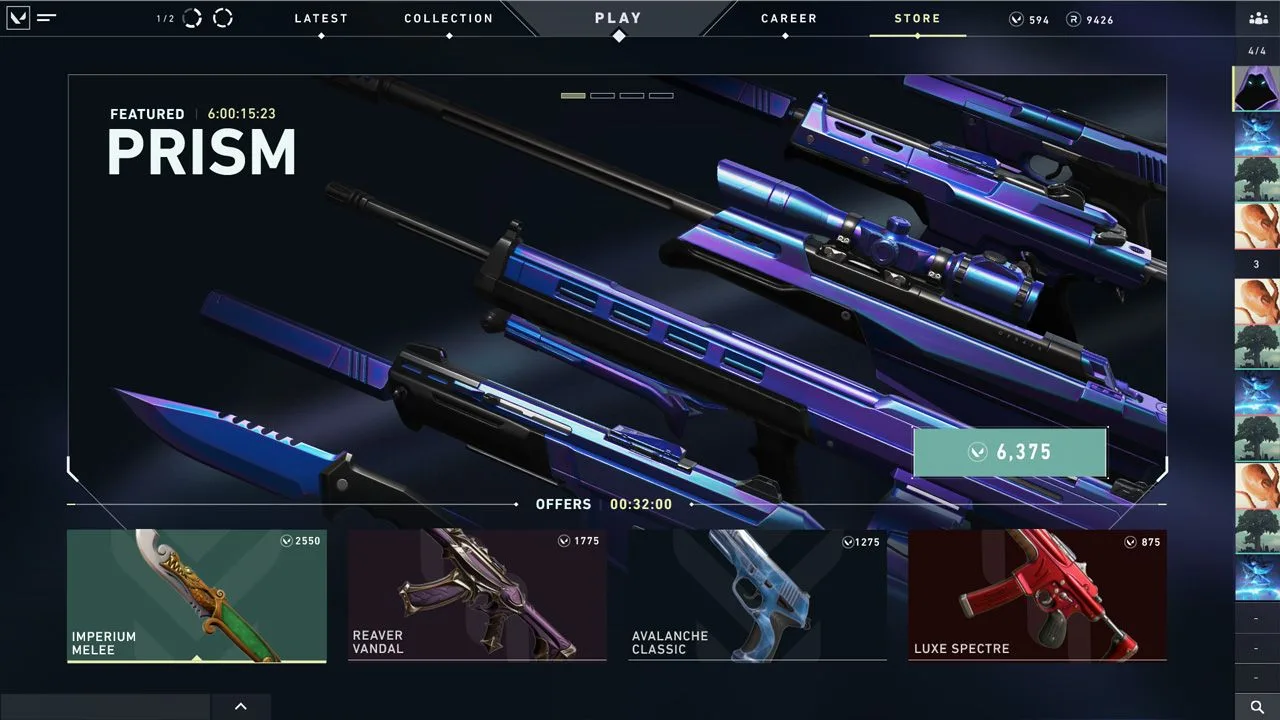
Riot’s 2020 store example shows separate VP and Radianite balances in the top-right corner. Use the account’s current client for its actual balances.[3]
Value the named rewards you will actually use
Riot’s historical ActIII Battle Pass article shows how Ruin, Surge and Serenity offered different cosmetic themes.[8] Specifying the weapon and exact skin turns a claim such as “several completed passes” into a list of usable items you can inspect.
Compare a configuration whose required weapon skins and variants are already available, with balances suited to any remaining upgrades. Extra unwanted skins and unverified completion claims do not replace those exact requirements.
View VALORANT account options