
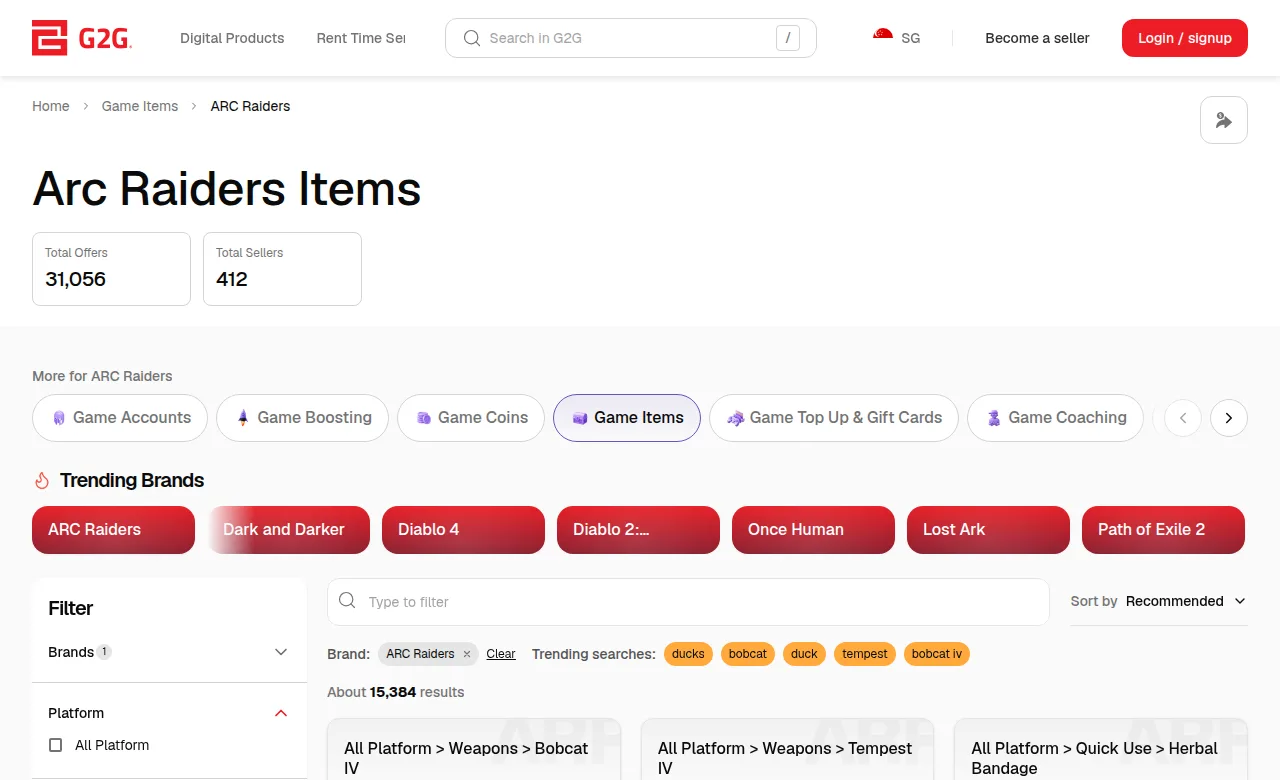
Which totals actually describe this item?
The public category view shows category-wide Total Offers and Total Sellers, named item groups and a Platform filter.[1] The counts in the screenshot are a dated snapshot and will change. A category’s seller count is not the number of reviews for one seller; a group’s availability or offer count is not a promise that your selected quantity is ready.
G2G’s sorting explanation uses several separate signals: offer sales in the past 30 days, offer ratings in the past 90 days, seller ranking, user level, order completion rate, delivery speed and seller chat response time.[2] Those first two periods describe ranking inputs. They do not mean every visible seller rating is a 90-day ARC Raiders rating.
Read the percentage with the adjacent review count and its stated scope. A hypothetical 100% from 10 ratings and 99% from 1,000 ratings provide different amounts of evidence, but neither predicts this delivery. Check recent feedback for a repeated delay or item mismatch when that feedback is available; distinguish comments about the same service from unrelated products.
Instant is a delivery signal, not a reply-time promise
G2G presents “Instant” when the offer’s delivery-speed setting is instant. It separately presents “Auto Delivery” for supported automatic delivery; its interface tooltip describes that automatic support.[5] [6] These labels are not interchangeable. The marketplace’s sorting policy also treats Delivery Speed and Seller Chat Response Time as different factors.[2] Reading “Instant” as merely a quick chat reply would assess the wrong promise.
For item orders, G2G requires the seller to complete delivery within the time stated in the listing and to use the method stated in the product description.[4] Thus the question is when you receive the described item, not when the seller first answers. Do not convert an unqualified Instant label into an invented universal number of seconds or assume it changes the in-game steps.
Quantity can change the duration. G2G’s upload guide gives an example of 10 minutes for 1–10 units and 20 minutes for 11–20 units.[7] Those are format examples, not a current ARC delivery estimate. For 12 units, the example would put the order in the 20-minute band; your selected listing’s actual quantity band and time are what matter.
| Signal | What it tells you | What to compare next |
|---|---|---|
| Rating and rating count | Feedback history with its displayed scope | Count, recency and whether feedback concerns this item or another service |
| Instant | The offer uses the Instant delivery-speed setting[5] [6] | Promised completion duration, selected quantity and required buyer actions |
| Auto Delivery | Offer supports automatic delivery[5] [6] | The exact product and automatically delivered content; do not assume every Instant offer uses it |
| Delivery Method | The in-game transfer method described by the offer[4] | Recipient, item total and how delivery is completed |
| Category totals | Counts across the category or grouped item offers[1] | Keep them separate from an individual seller’s review and order history |
Embark prohibits trading ARC Raiders items for anything of value, including real money, and lists this among conduct that can lead to a temporary or permanent ban.[12] Marketplace ratings or GamerProtect do not prevent that game-account enforcement.
For an item-option comparison, match the item variant and total quantity, then compare the actual delivery duration and method. If delivery requires meeting in a raid, agree on the recipient, who brings the item, and the completion and retry terms before weighing a higher rating against a clearer delivery promise.
View ARC Raiders item optionsWhat must the written delivery terms settle?
Read the full item name and variant, unit size, number of units, the recipient identifier and the transfer method. If the delivery route involves a raid, the terms should say whether completion means receiving the item or successfully keeping it after extraction, and what happens after death or a failed extraction. Those are transaction terms to compare, not a universal G2G retry guarantee.
G2G’s Items rules prohibit fulfilling item delivery by using the buyer’s login credentials and require communication through G2G chat.[4] A character or friend identifier for coordination is different from a password or recovery code. Keep the agreed quantity, completion point and any retry arrangement in the on-platform conversation.
GamerProtect has a delivery window and exclusions
The buyer policy covers non-delivery and an item that does not match its description. It excludes confirmed receipt, buyer’s remorse, off-platform transactions and changes by the developer or publisher after successful delivery.[8] It treats goods as accepted if no issue, claim or complaint is submitted within 72 hours of delivery and says refunds are not issued after payment is released to the seller.[8] This is a marketplace claim process, not automatic protection against every loss in a raid.
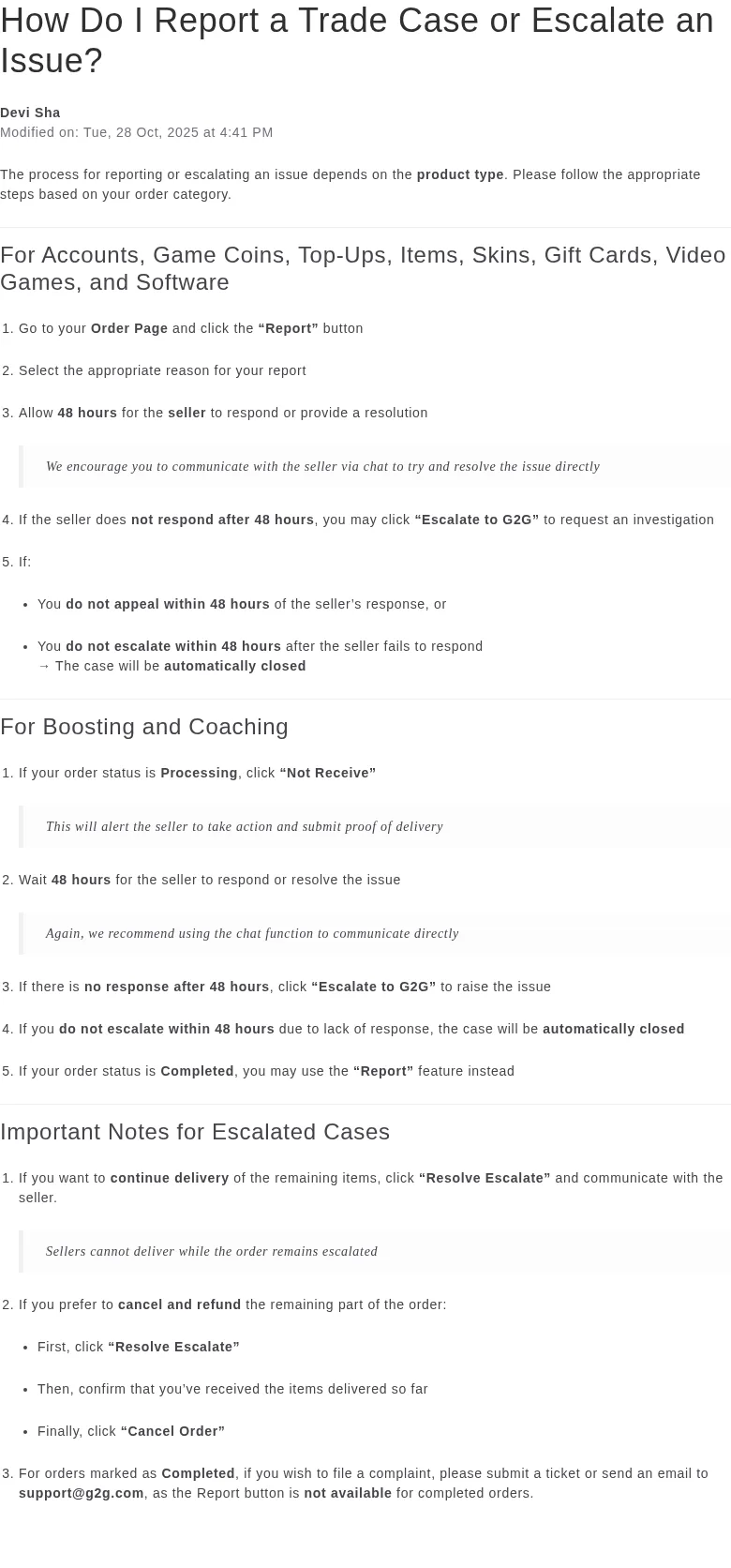
For an Items order, use Order Page → Report and choose the relevant reason. G2G allows the seller 48 hours to respond; if there is no response, use Escalate to G2G. Its help article also gives a 48-hour appeal deadline after a seller response or escalation deadline after non-response.[11] The “Not Receive” instruction in that document belongs to Processing Boosting and Coaching orders, not the Items route.
If an order is already Completed, G2G says the Report button is unavailable and directs complaints to a support ticket or support email.[11] Screenshots, chat records and delivery proof should be submitted through G2G.[9] Record the agreed item and quantity and the actual receipt before confirming completion.
A missed estimate needs a concrete next step
G2G’s delay guidance says the order does not automatically close just because delivery is late. Once the promised delivery time has passed and you no longer wish to wait, you may request cancellation.[10] That is different from assuming an Instant label causes an automatic refund at a particular minute.
Compare equivalent ARC item configurations using the full quantity, promised receipt time, buyer actions and completion or retry terms. Use rating history as context, then favor the delivery arrangement whose written terms fit the item you actually intend to receive.
View ARC Raiders item optionsSources
- ARC Raiders Items — public Singapore category
- G2G listing sorting factors
- G2G Understanding User Ratings
- G2G Items Service Rules and Descriptions
- Current G2G interface labels — Instant and Auto Delivery
- Current G2G public interface — delivery-speed and delivery-method mapping
- G2G Bulk Upload for Items — quantity-dependent delivery speed
- GamerProtect for Buyers
- What GamerProtect Covers?
- Seller Did Not Deliver Within the Promised Delivery Time
- Report a Trade Case or Escalate an Issue
- ARC Raiders Ban and Enforcement Policy