
A shard is not a selectable game server
| Field | Where to check | What it establishes |
|---|---|---|
| Residence | Signed-in Change Region of Residence tool | Account region and change eligibility[1] |
| KR environment | Play lobby server selector | Seoul is the server listed for KR[2] |
| AP environment | Play lobby server selector | Tokyo, Hong Kong, Singapore, Sydney, Mumbai and Manila[2] |
| Premier SMS | Premier; Settings > General > Account | Verified status and Premier eligibility[3] |
| Competitive MFA | Play > Competitive | Verify Account replaces Start when Riot Mobile verification is required[6] |
Residence determines the available shard, payment methods and player compatibility. Server Select picks a location within that environment; it does not move the account to another shard. Connecting from Korea therefore does not turn an AP account with Tokyo available into a KR account with Seoul available.[1] [2]
A new email does not change the original-owner rule
Riot prohibits account sales, transfers and credential sharing, and Player Support only helps the original account owner. Changing the current email does not transfer that support status.[7] [8] To inspect current security settings, review the account email, MFA methods and Login Management; LOG OUT EVERYWHERE ends existing sessions and revokes trusted-device status.[5]
Open the server selector before comparing latency
- Open Play and select the intended mode.
- Be the party leader or play solo, then open the connection-status icon above your player card.
- Read the available server names and ping values. The location you need must actually appear in this account’s list.[2]
- Invite the friends you plan to play with and check that you can use the same queue. Region assignment affects player compatibility.[1]
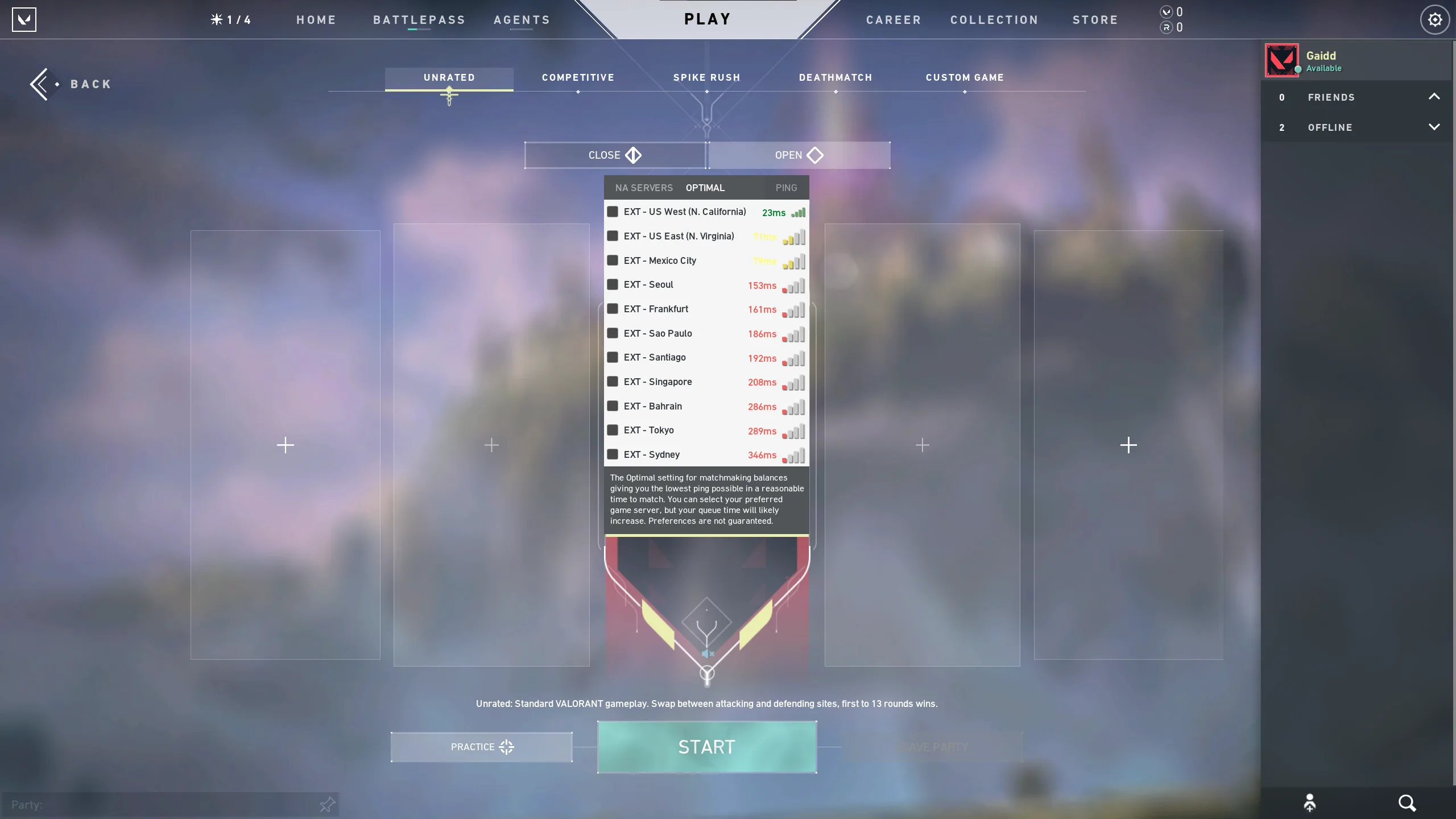
Riot’s support example shows the icon above the player card and the expanded ping list. The selectable locations in your client depend on its shard.[2]
Use the residence tool for an incorrect region
Open Riot Support’s Change Region of Residence and sign into the account. Its result determines whether a correction is available for that account. A listing label, interface language or IP address does not replace this result. Match the residence result with the lobby list and the friends you need to queue with.[1]
Verify Premier through the Premier hub
Click Verify in Premier, choose the country code, enter your phone number and enter the code received by SMS. A verified account shows Create a Team instead of Verify; you can also check Settings > General > Account. Premier requires verification throughout the Stage, at least one ranked placement in the account’s lifetime and no active bans or restrictions.[3] [4]
Only one phone number can be connected to the account. After unlinking it, using a different number has a six-month wait; the original number can be relinked at any time. Unverification does not automatically remove you from a team, but it prevents Premier queueing until verification is restored. An account already using someone else’s number may therefore miss your intended Stage even when the listing says “verified.”[4]
Competitive’s Verify Account button means Riot Mobile MFA
Accounts that reach Ascendant or above, and accounts suspected of sharing, must use Riot Mobile MFA for Competitive. This now applies in every region, including EU and APAC. Dropping below Ascendant does not remove the requirement. Neither Premier SMS nor a different authenticator app satisfies this particular ranked check.[6]
On the Riot account page, enable email MFA first, then choose Activate beside Riot Mobile. Sign into the same account in Riot Mobile, scan the displayed QR code and approve Enable. Keep the email inbox and mobile approval method accessible for subsequent sign-ins.[5]
When comparing account configurations under that restriction, match the shard and intended servers first. For Premier, add SMS status and the date your own number can be used. For Competitive, add the live Verify Account state and Riot Mobile setup.
View VALORANT account optionsIf the SMS code is late or the entry box is compressed
If verification fails, wait ten minutes before trying again. Check the selected country code and phone number including its area code, and avoid repeatedly submitting the initial request while its message is delayed. Riot also recommends 1920×1080 resolution when a compressed verification pop-up causes input errors.[4]
If verified status does not let you join a Premier team
Check active restrictions and whether the account has completed a ranked placement in its lifetime. After a team’s first match of the Stage, it cannot add a player whose MMR would move it to another Division. Division uses the top five players, so verified status and eligibility for that particular roster are different questions.[3]
Contender and Invite teams also require Contender Eligibility: in the current or previous Stage, a Weekly or Playoff match in Contender/Invite, an Immortal3-or-higher Competitive peak, or participation in the Elite5 playoff. SMS verification alone does not establish this upper-division eligibility.[3]
If the same Riot account also has 2XKO progress
Riot’s residence tool warns that changing regions may reset 2XKO progression. If you use 2XKO on the same Riot account, contact Player Support about that account before completing a residence change. Selecting a server inside the VALORANT lobby is separate from this account-level region correction.[1]
Match the configuration to the people and mode you play
For a party using Seoul, look for the KR/Seoul environment rather than a generic Asia label. For an AP party, match its actual server list. A Premier configuration also needs a usable phone-verification arrangement before the Stage you intend to join. Treat “verified” as a specific screen state, not a substitute for these different requirements.[2] [4] [6]
View VALORANT account options