
For example, a Season 15 Ladder Softcore character needs a Season 15 Ladder Softcore Ber rune. A Non-Ladder Softcore copy misses the Ladder boundary; a Ladder Hardcore copy misses the survival-mode boundary. These are separate environments, not quality grades.[1] [2]
Which environment does the character use?
Blizzard identifies Online, Offline, Ladder, Non-Ladder, Hardcore, Expansion, and Non-Expansion as distinct play modes, and Ladder is unavailable to offline characters.[2] The four destinations below assume an online character in the same game era as the item.
| Recipient | Matching item environment | Season-end destination | Death |
|---|---|---|---|
| Ladder Softcore | Same current Ladder, Softcore and game era | Corresponding Non-Ladder Softcore group[1] | Can respawn[3] |
| Ladder Hardcore | Same current Ladder, Hardcore and game era | Corresponding Non-Ladder Hardcore group[1] | Permanent death[3] |
| Non-Ladder Softcore | Non-Ladder Softcore, same game era | Already Non-Ladder | Can respawn[3] |
| Non-Ladder Hardcore | Non-Ladder Hardcore, same game era | Already Non-Ladder | Permanent death[3] |
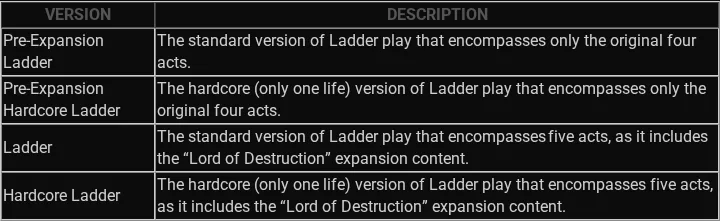
Blizzard’s own mode table separates Pre-Expansion Ladder from the Lord of Destruction versions, and standard play from the one-life Hardcore versions.[1]
Settle the account-rule drawback before price
Blizzard’s EULA prohibits collecting in-game items for outside real-money sales and exchanging service-provided content for value outside the program.[4] Matching the mode does not remove that account-policy restriction.
Check the recipient character on the current screen
- Select the exact character that should receive and use the item.
- Confirm that it is an online character; Ladder is not available for offline characters.[2]
- Read whether the character is Ladder or Non-Ladder. If it is Ladder, confirm the current season rather than accepting an undated “Ladder” label.
- Read whether the character is Hardcore or Softcore. Treat this as independent from Ladder status.
- Match the item offer to both fields, then confirm the game era, platform, account access, and proposed in-game session.
- Compare the full item name, base, requirements, sockets, ethereal status, and variable rolls on one current item screen.
Season 15 started on August 21, 2026 at 5 p.m. PDT. Patch 3.3 separately limits its changed items to Ladder in Reign of the Warlock; it does not apply those changes to D2 Classic or Lord of Destruction. For example, The Ward gained one socket and Manald Heal gained +10% Faster Cast Rate in that specified environment.[1]
Check current compatible D2R item optionsDo not treat a future Ladder move as current compatibility
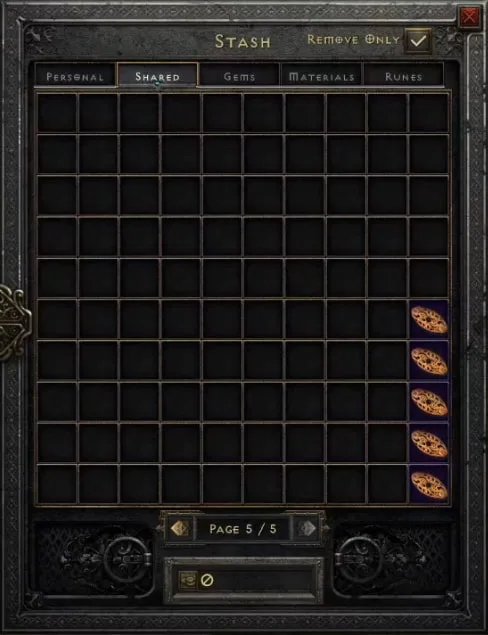
When Season 14 ended, its Ladder characters moved to their corresponding Non-Ladder groups. Season 14 shared-stash items entered Withdraw Only tabs, and Blizzard says players have Season 15 to retrieve the items they want to keep.[1] This transition is one-way in the decision that matters: it can eventually create a Non-Ladder item, but it does not turn a Non-Ladder item into a current Ladder item.
Recover Season 14 items during Season 15
- Open the corresponding Non-Ladder character group.[1]
- Open the Withdraw Only Shared Stash tabs marked with the checked Past box.[1]
- Move the Season 14 items you want to keep into normal inventory or storage; these tabs are for withdrawal.[1]
- Finish during the documented Season 15 retrieval window. Season 13 leftovers were removed when Season 14 ended.[1]
Hardcore changes the value of the item
Hardcore is not simply a difficulty label. Blizzard describes Hardcore as a one-life mode, and its account of D2R’s race to level 99 states that death is permanent and forces the player to begin again at level one.[1] [3] A valuable item assigned to a Hardcore character therefore carries a materially different loss risk from the same item used in Softcore.
A later transition does not deliver an item today
A Non-Ladder Softcore character cannot receive a current Ladder Softcore item through a present-day shared trade. The season-end transition may eventually place the Ladder item in Non-Ladder Softcore, but it does not convert a Non-Ladder item into Season 15 Ladder. For an item needed now, select the matching current environment.[1] [2]
Platform access and the actual player-to-player session are separate checks. Use the platform decision next if the item and character already match on Ladder and Hardcore status.
If the item is a runeword, environment compatibility still does not prove that its base, socket count, ethereal state, or variable rolls fit the build.
Use the character’s complete destination as the selection: for example, Season 15 Ladder Softcore in Reign of the Warlock, or Non-Ladder Hardcore in Lord of Destruction. Then compare the actual item name and properties within that destination.
Compare D2R item options for your matched environment