
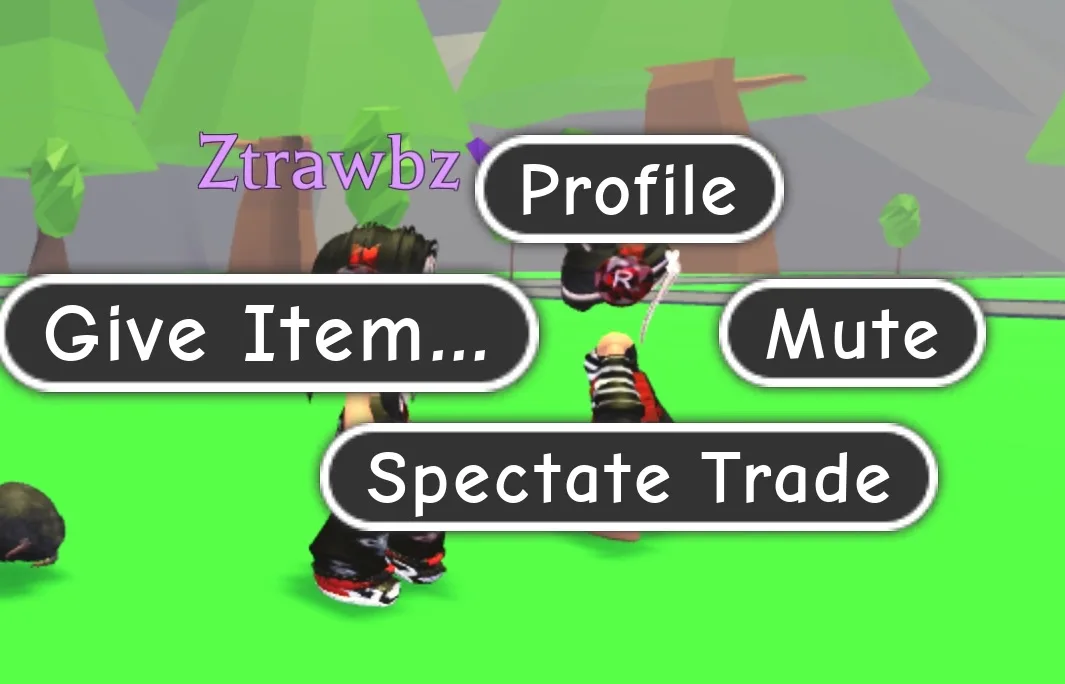
Send a supported Adopt Me item through Give Item
- Meet the recipient in Adopt Me and click or tap their avatar. Choose Give Item from the interaction menu.[1]
- Choose From Backpack in the first prompt. Back cancels and returns to the preceding menu.[1]
- Select the actual item from the Backpack. Legendary items are excluded from this gift route.[1]
- Read the final confirmation and choose Yes to send the item immediately.[1]
- The recipient checks the item in their own Backpack before treating it as received.
The recipient can have gifting disabled, so a failed attempt does not necessarily mean the item is missing. Once Yes sends the gift, the creator says Support cannot return it.[1] If the desired Legendary item is unavailable in the gift selection, use its supported trade route rather than trying to make a game-pass payment stand in for the item.
Prepare licensed trades for pets and houses
Adopt Me requires a Trade License for Ultra Rare and Legendary pet trades and house trades. Go to the Safety Hub, speak to Agent Jake and answer all three test questions correctly. You can retry if you fail.[4] Both players need their own usable trading controls; a sender’s eligibility does not unlock the recipient’s account.
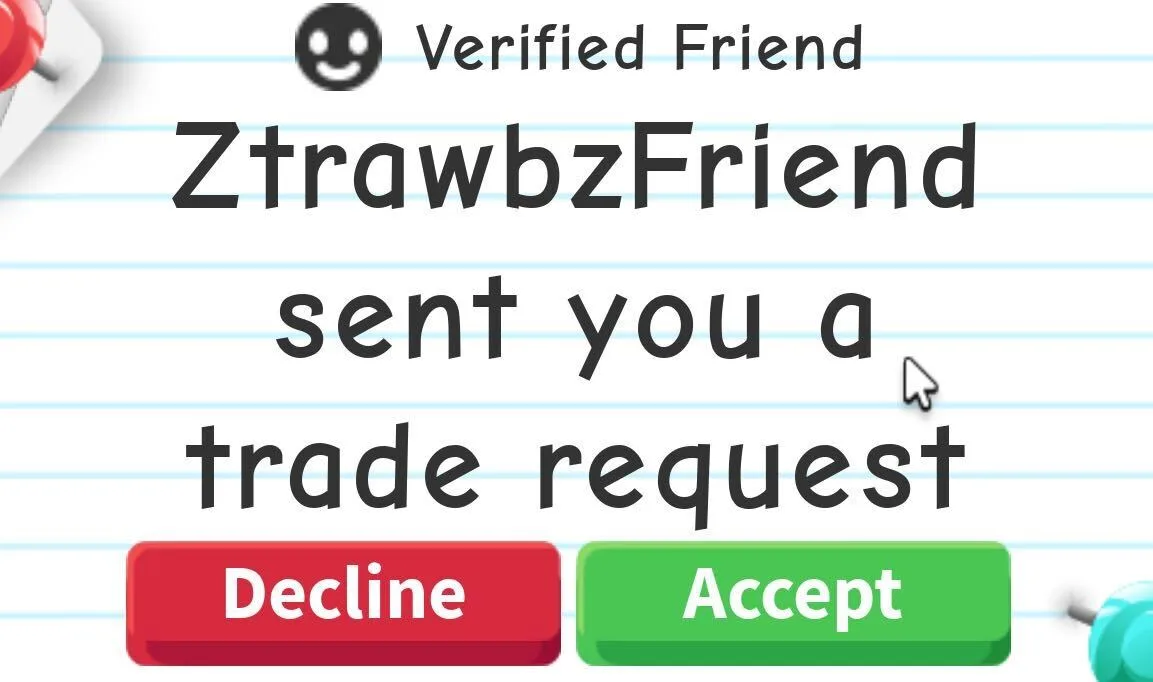
The official request screenshot above shows Accept, Decline and the Verified Friend label. The smiley face and Verified Friend mean the partner is on your Roblox friends list.[6] Use the actual username when identifying the recipient; display names are not unique.[10]
- On the recipient’s trade-request screen, compare the partner’s username and choose Accept.[6]
- Put the actual promised items inside the trade window, rather than treating an item promised for later as part of this exchange.[7]
- Review the second confirmation screen before final acceptance. Adopt Me allows up to 18 items in one trade.[7]
- After both players complete the trade, inspect the received item and open the Trade History. Use the Trade License toy, the book beside Agent Lily or the Trade History app on the Trading Hub Phone.[4]
A pass or code has a different completion state
| Desired result | Supported route | What establishes receipt |
|---|---|---|
| Permanent in-game privilege | Purchase the actual game pass[2] | Ownership and the stated privilege on the buying account |
| Supported Adopt Me item gift | Avatar > Give Item > From Backpack > Yes[1] | The received item in the recipient’s Backpack |
| Adopt Me licensed pet or house transfer | In-game trade; houses start at Trade House[3] [4] | Received item or house plus Trade History |
| Owned Blox Fruits merchandise DLC | Left gift icon > Reward Codes > Redeem![9] | Rewards issued to the account redeeming the code |
A game pass charges once for privileges in its game. Roblox disabled cross-game pass sales on May 30, 2026; that change does not create a way to transfer a purchased pass between people.[2] Gift-card promotional virtual items are granted to the account redeeming the card, not through a universal menu that gifts arbitrary experience items.[13]
Blox Fruits provides a useful counterexample to interpreting icons literally: the gift icon in its creator DLC guide opens Reward Codes. Redeem! grants the owned code reward to the playing account.[9] For fruits, the creator names Shop and requires exchanges to finish inside its Official Trading System. A promise to gift after a trade is among the methods its FAQ warns against.[8]
Roblox restricts off-platform secondary-market transactions in game virtual content.[12] A functioning in-game transfer menu does not override that acquisition rule. Passwords,cookies,two-step verification and backup codes are never needed by another player to use the supported route.[11]
Compare Roblox experience item delivery optionsA house trade starts at the mailbox
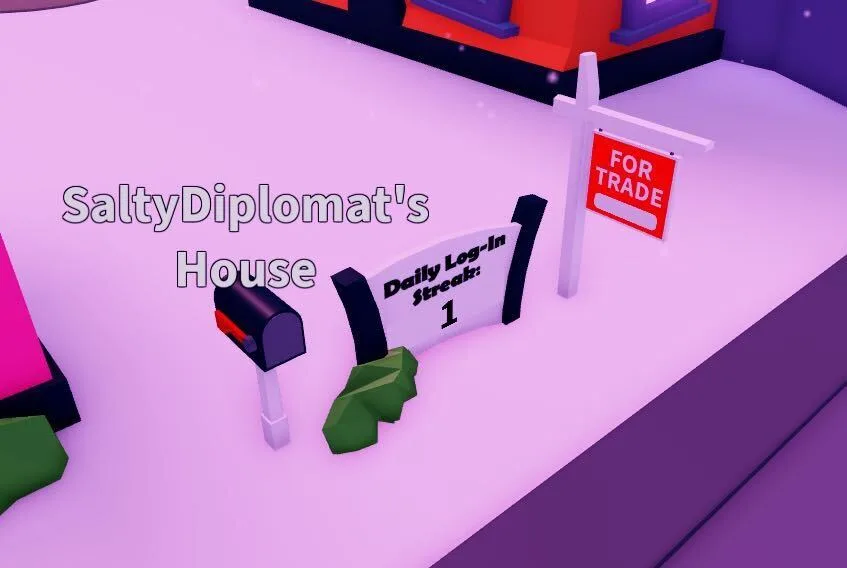
The owner approaches the mailbox in front of the house and chooses Trade House. A FOR TRADE sign appears. The other player interacts with that sign to tour the furniture and expansions, then sends a trade request from inside the house. Once both players accept, the house transfers and the former owner moves to another owned house.[3] This is a complete transfer route, rather than a gift selected from a Backpack.
The VIP house cannot be traded, and an owner with only one house must own a second before trading it.[3] Tour the actual interior before acceptance: the house name alone does not describe its furnishings or expansions.
Restore missing trade requests without replacing the item
In Adopt Me, click the right-hand settings cog, choose Interactions from the top-right drop-down and inspect Who can trade with me?. No one disables incoming trades.[5] If you previously chose Ignore on that player’s requests, sending them a trade request clears the temporary block; starting a new play session also clears it.[5] Resolve that setting before interpreting a missing request as a need to obtain another item.
Once settings and eligibility are ready, a player who still needs an experience-specific item can compare the delivery options below. Keep Legendary Adopt Me items on the trade route, supported ordinary gifts on Give Item, and Blox Fruits code rewards on the actual receiving account.
Compare Roblox experience item delivery optionsSources
- Adopt Me gift workflow
- Game pass ownership and cross-game sales
- Adopt Me house transfer
- Trading eligibility and completion history
- Trade interaction settings
- Trade request and participant labels
- Trade acceptance and item restrictions
- Blox Fruits actual supported acquisition
- Blox Fruits code redemption
- Recipient identity
- Credentials handling
- External acquisition rules
- Gift card virtual reward scope