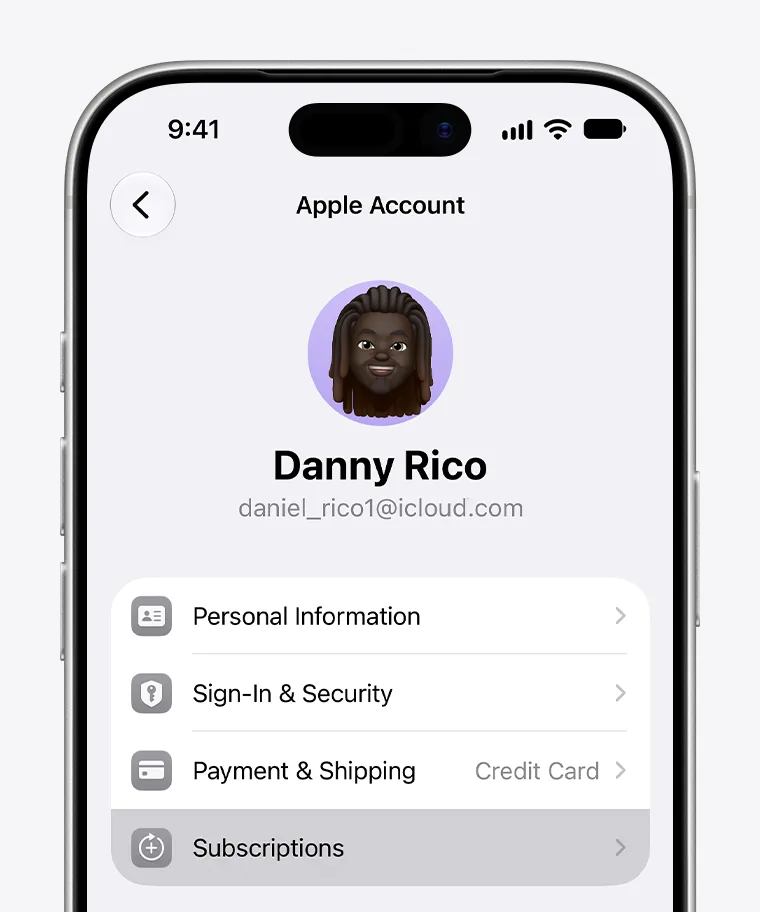
To cancel CapCut Pro, start with the latest receipt and use the subscription controls of the company that charged you. An Apple purchase must be managed with the paying Apple Account, a Google Play purchase with the paying Google Account, and a direct web purchase with the CapCut account connected to the order.134 Deleting CapCut does not stop a Google Play subscription.4
Check the receipt before opening CapCut settings
Note the billing company, masked account email, plan name, order number, charge date and renewal date shown. The CapCut login currently open on your device may not be the identity that paid.
| What the receipt shows | Where to cancel | Account to open | What to save |
|---|---|---|---|
| Apple | Settings > your name > Subscriptions > CapCut3 | Apple Account connected to the purchase3 | The expiration message or absence of a Cancel button3 |
| Google Play | Google Play subscriptions > CapCut4 | Google Account used for the purchase | Updated status and renewal or expiration date4 |
| Direct CapCut web order | Subscription controls in the purchasing CapCut account1 | CapCut login connected to the order | Displayed non-renewal status or support confirmation |
| No receipt or an unclear card charge | Search email and match the merchant descriptor | Each plausible store and CapCut account | A matched receipt before attempting cancellation |
| Two recurring charges | Trace and manage each transaction separately | Account attached to each receipt | Separate confirmation for each subscription |
Cancel through Apple
- On an iPhone or iPad, open Settings and tap your name.
- Tap Subscriptions, then select CapCut.
- Tap Cancel Subscription and follow the instructions shown.3
- Open the entry again. Apple says the subscription is already cancelled when there is no Cancel button or a red expiration message appears.3
If CapCut is missing, find the Apple receipt and check the Apple Account associated with it. A subscription purchased by a family member must be cancelled by that account holder.3
Cancel through Google Play
- Open Google Play subscriptions while signed in to the Google Account that paid.
- Select CapCut.
- Choose Cancel subscription and complete the displayed steps.4
- Reopen the record and save its updated status and date. Google says access generally remains until the end of the paid period after cancellation.4
If CapCut is not listed, switch to any other Google Account you use. Google identifies a different purchasing account as one reason a subscription may be missing.4
Cancel a subscription bought on CapCut’s website
Sign in to the CapCut account connected to the web order and use its subscription controls. CapCut’s US terms say a recurring web subscription must be cancelled through the applicable CapCut account before the current period ends.1
If the control is missing or does not work, CapCut support asks for the login method, device or platform, a screenshot, and the order number or receipt.2 Share only the information needed to identify the order; never send your password or full card number.
What if the subscription is missing?
- Search email for receipts from Apple, Google Play, CapCut or a payment processor named on the charge.
- Match the receipt date and amount to the bank or wallet transaction.
- Check the store account named on the receipt. Apple and Google both direct users to investigate the purchasing account when a subscription cannot be found.34
- Confirm the CapCut sign-in method used at checkout, such as Apple, Google or email.
- Look for another receipt if you see more than one recurring charge.
- If no account matches, send CapCut support the requested account, platform, screenshot and order details.2
Confirm the subscription will not renew
Keep a screenshot or confirmation email containing the billing provider, masked account identity, plan or order reference, cancellation time, exact status wording and displayed expiration date.
Cancellation does not necessarily remove Pro access immediately. CapCut’s current US terms say access continues through the current paid period before downgrade, subject to applicable conditions, and Google Play gives similar guidance for ordinary cancellations.14 Rely on the date displayed for your subscription rather than calculating one.
A refund is a separate request
Cancellation stops a future renewal; it does not automatically reverse an existing charge. Apple sends eligible refund requests through its Report a Problem service and says eligibility varies by country or region.5 Google Play publishes a separate refund process with region-specific conditions.6
For direct purchases, CapCut’s US terms describe a full refund within 14 calendar days only if Premium Services have not been used, while preserving rights required by law.1 Do not apply that US condition to another market without checking the terms governing the actual order.
Prepare projects before Pro access changes
Before the displayed end date, check any work that depends on Pro tools, paid assets, collaboration features or cloud storage. This can prevent a subscription change from interrupting an unfinished project.
- Export finished work in the formats you need.
- Open recurring projects and note paid effects, fonts, templates, tools and export settings.
- Back up irreplaceable drafts, source media and collaboration records.
- Read any storage notice on the account. CapCut’s US terms say paid cloud capacity is suspended after the relevant subscription ends and instruct users to transfer or back up content within the notified period.1
- Test whether an important project can still be completed without its paid elements.
The main drawbacks are possible workflow disruption after the paid term, unresolved refund eligibility, and cancelling one account while a separate subscription continues to renew. Treat each recurring charge as a separate record until its status is clear.
Decide whether your editing workflow still needs CapCut ProBefore you leave the subscription screen
- The receipt and subscription record name the same billing provider.
- The Apple, Google or CapCut account that paid is confirmed.
- A non-renewal status or expiration date has been saved.
- Any refund request is being handled through the responsible billing provider.
- Projects, exports and cloud-dependent files have been reviewed.
Stay on CapCut Free or choose another editor if your work no longer depends on Pro, the intended account is not under your control, or an earlier subscription charge remains unresolved.
Review CapCut Pro checkout terms before paying againIf you deliberately subscribe again later
Wait until every earlier subscription has a confirmed status. If you still need paid features, compare the official checkout with contextual purchase options that attach the subscription and account recovery to an account you control. G2G is one place to inspect digital-product listings as part of that comparison.
Compare future CapCut Pro purchase options