
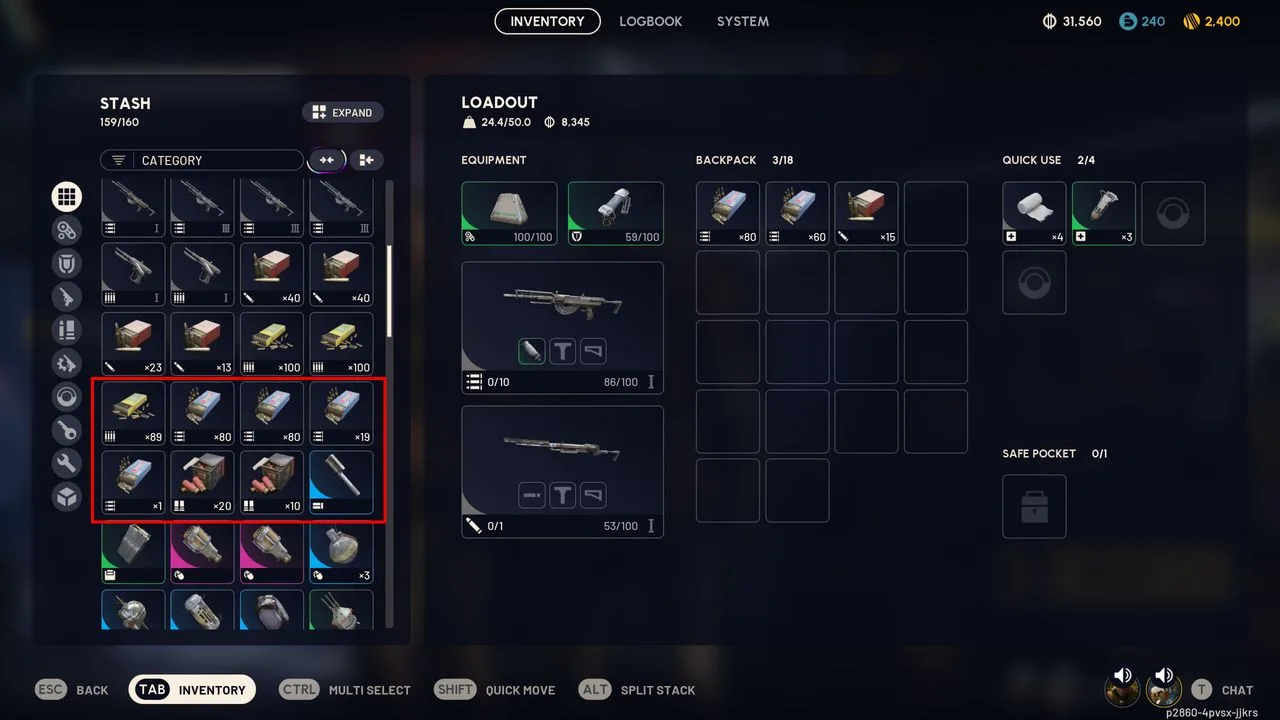
Actual Inventory capture by PC Gamer. Stash is on the left; equipped gear, Backpack, Quick Use and Safe Pocket are on the right. The source’s red outline marks loose item stacks.[4]
Did the transaction match the item you wanted?
Open the transaction record and check the exact item name, form, variant, quantity, and any bundled components. Compare each detail with the item you have been looking for in the game. If one field differs, save the record and treat the problem as a configuration mismatch instead of buying the item again.
Capture the relevant transaction details, but leave out payment credentials, private messages, and unrelated account information. Keep the original wording visible so support can tell the difference between a missing delivery and an item that did not match its description.
Where did the delivery stop?
Read the delivery terms, then reconstruct the handoff in order. Note the transaction status and timestamp, the stated transfer method, the last action you completed, and anything that still depended on another party.
If the order is marked delivered but you cannot verify the item, do not confirm receipt. For an Items order, open Order Page → Report, choose the reason, and explain the missing item through G2G Web Chat. Allow the seller 48 hours to respond or resolve it. If there is no response, use Escalate to G2G; escalate within the following 48 hours or the case closes automatically. If the seller responds but the issue remains unresolved, appeal within 48 hours of that response. For an order already marked Completed, submit a support ticket instead: the Report button is unavailable. “Not Receive” is the Processing Boosting/Coaching route, not the Items route.[7]
Check Stash, equipped slots and Safe Pocket separately
- Open Inventory in Speranza. In Stash, choose the all-items category and clear the category filter; inspect the item name and quantity. The screenshot below shows Stash on the left and Loadout on the right.[4]
- In Loadout, inspect Equipment and weapon slots, Backpack, Quick Use and Safe Pocket. An equipped weapon or quick-use consumable is outside the Stash list.[4]
- If you changed to Free Loadout, return to the Stash: the actual selection screen says custom-loadout items move back there. It also states that Free Loadout has no Safe Pocket.[5]
- If the missing item was a blueprint you selected with Learn and Consume in Speranza, check its learned recipe in the Workshop. That action uses the physical blueprint to unlock the recipe; a learned blueprint is marked with a check.[6]
A completed handoff does not always mean the item should still be in the stash. ARC Raiders’ official help center says that a Raider knocked out Topside loses everything except items in the Safe Pocket. That includes gear brought in the loadout and items collected during the run.[3] If the item entered a loadout before the knockout, it was lost during the run rather than missed in the original inventory search.
If the item was delivered during a raid, record whether it went into Backpack, Quick Use or Safe Pocket, then whether you extracted or were knocked out. Embark’s loss rule applies to carried items outside Safe Pocket.[3] That sequence separates a delivered item lost in a raid from an incomplete handoff.
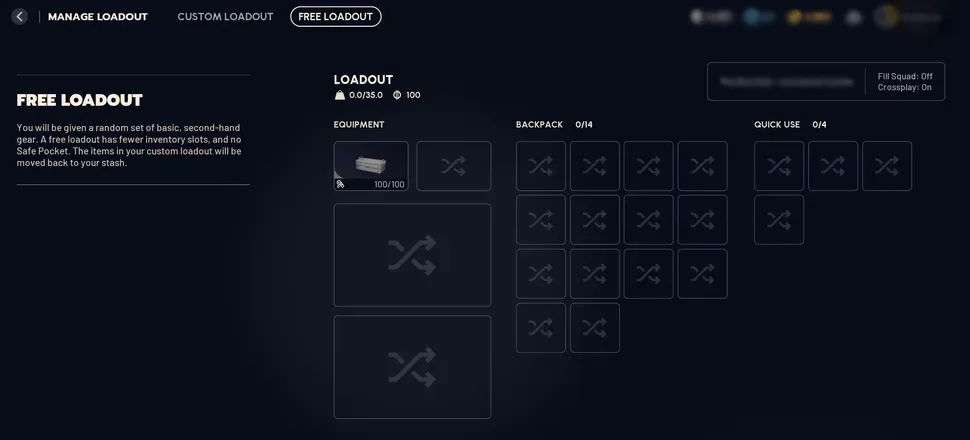
Actual Free Loadout selection screen supplied by ARC Raiders Wiki. Its left-hand explanation states that custom-loadout items move back to Stash and this loadout has no Safe Pocket.[5]
What should you do next?
| What you found | Where it went wrong | What to do next |
|---|---|---|
| The record names a different item, form, variant, quantity, or bundle | Configuration | Save the transaction record and report the mismatch through the transaction’s support channel. |
| The handoff still has an unconfirmed step | Delivery | Follow only the documented delivery process and ask for clarification through the same transaction channel. |
| The order is marked delivered, but you cannot verify receipt | Receipt confirmation | Do not confirm receipt. Use Order Page → Report for Items and give the seller 48 hours. If unanswered, escalate within the next 48 hours; if the seller replies without resolving it, appeal within 48 hours of that reply. For Completed orders, submit a support ticket.[7] |
| The item entered a loadout before the Raider was knocked out Topside | In-game loss | Check the Safe Pocket for protected contents. Other carried items are subject to the game’s knockout loss rule.[3] |
| You can trace the handoff to completion, but the item is still absent | Inventory or unresolved delivery | Capture the expected item, status, timestamps, and relevant inventory views, then escalate without assigning blame. |
Save the details support will need
Save the transaction status, delivery terms, timestamps, and screenshots of both the expected item and the relevant inventory view. Describe the last confirmed action in one sentence. G2G’s escalation guidance asks buyers to attach evidence or screenshots when an unresolved case is raised for review.[2]
When does a replacement make sense?
A replacement becomes a reasonable option only after the original item is confirmed unrecoverable or you establish that the earlier configuration did not match what you intended. Before reviewing another option, check the exact item, form, variant, quantity, and delivery conditions once more so the replacement solves the problem you actually found.
View ARC Raiders Items optionsSources
- I Didn't Receive My Order, but the Seller Marked It as Delivered
- Should I Click “Confirm Received” Before I Receive the Item?
- Your first raid
- ARC Raiders Inventory original gameplay capture by PC Gamer
- ARC Raiders actual Free Loadout selection screen
- ARC Raiders blueprint learning operation
- G2G Items: Report, escalation deadlines and Completed order support