
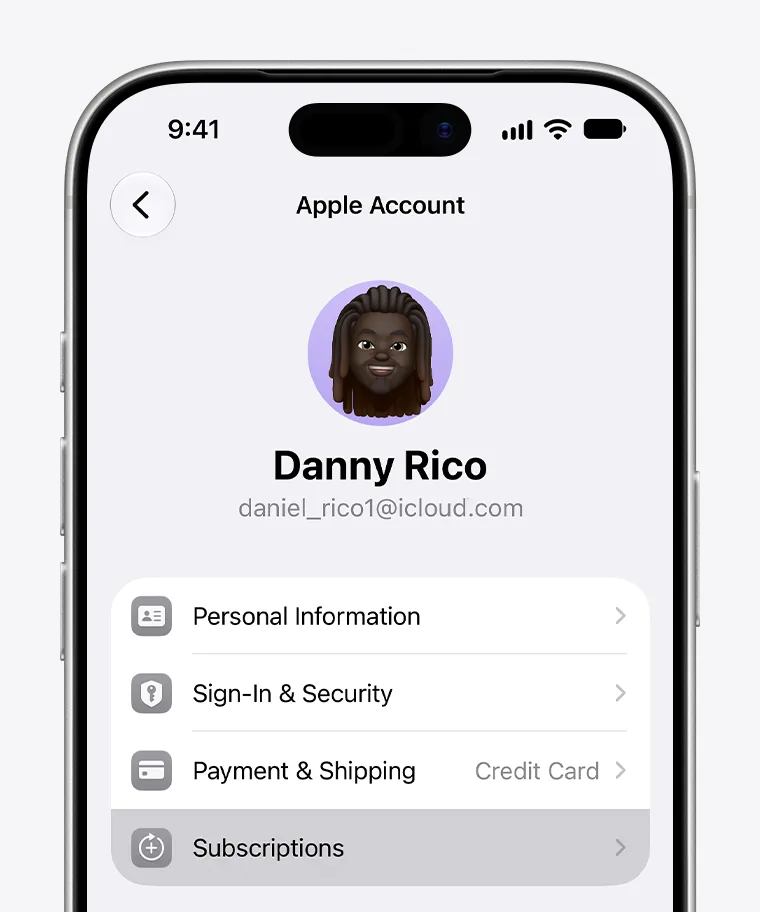
The cancellation route for each payment provider
| Receipt provider | Steps | Completion or fallback |
|---|---|---|
| Apple/App Store | Settings → your name → Subscriptions → CapCut → Cancel Subscription | No Cancel button or a red expiration message means it is already canceled.[1] |
| Google Play | Profile → Payments & subscriptions → Subscriptions → CapCut → Cancel subscription | Follow the confirmation prompts under the purchasing Google account.[2] |
| Direct CapCut web/PC billing | Original CapCut account → Payment Management → Transaction History or Subscriptions | Locate the order; if the cancellation control is unavailable, submit the specific order to CapCut support.[3] [4] |
On iPhone, the pictured Subscriptions row is inside Settings under your Apple Account. Select CapCut and cancel. Apple says a missing Cancel button or a red expiration message means the subscription is already canceled.[1] If CapCut is absent, match the Apple Account on the emailed receipt; a different Apple Account will not display that purchase.
For direct web billing, locate the order in Payment Management
Sign in using the CapCut login method associated with the purchase. CapCut’s web/PC guidance directs users to Payment Management and then Transaction History or Subscriptions.[3] Open the relevant order or subscription and use its cancellation control. An Apple or Google receipt belongs to that provider’s route, even if you currently edit on a computer.
If the web control is unavailable, use the support link in CapCut’s auto-renewal help page. Submit the account email or login method, the device and platform, the order number or receipt, and a screenshot of the unavailable control.[4] Ask to cancel auto-renewal for that specific order and request written confirmation. This is the documented fallback for a missing cancellation option, not another purchase.
Cancellation and a refund are separate outcomes
After cancellation, retain the provider’s expiration date or confirmation. Google Play generally keeps access for the paid period after cancellation.[2] Stopping the next renewal does not itself establish eligibility for refunding an earlier charge. A refund request goes to the provider shown on that earlier receipt.
Once the old renewal is canceled, a future project may still need Pro-only tools. If you later compare another subscription, match its duration and account control to that new project; the completed cancellation does not require buying again.
Compare CapCut Pro options for a future editing project