
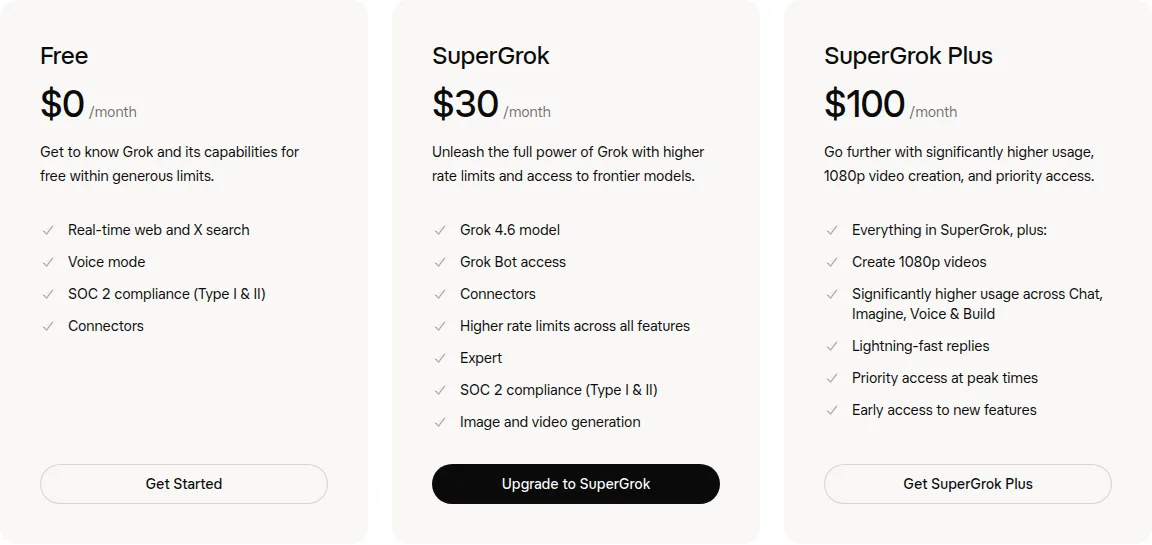
What do you get with each plan?
| Plan detail | Grok Free | SuperGrok | SuperGrok Plus |
|---|---|---|---|
| Public monthly price | $0/month.[5] | $30/month.[5] | $100/month.[5] |
| Grok 4.6 | Included.[5] | Included.[5] | Included.[5] |
| Imagine image generation | Included within Free usage.[5] | Included with higher usage.[5] | Included with significantly higher usage.[5] |
| Video generation | Not included in the feature matrix.[5] | Included.[5] | Included, with 1080p video creation.[5] |
| Expert | Not included.[5] | Included.[5] | Included.[5] |
| Grok Bot | Not included.[5] | Included.[5] | Included.[5] |
| Shared functions | Web/iOS/Android, Grok Build and connectors; limited web/X search.[5] | Same functions plus higher limits.[5] | Same functions with greater capacity, faster replies and early access.[5] |
| Best fit | Chat and occasional images within Free usage. | Expert, Bot, video or more regular usage. | 1080p video or workloads needing more capacity. |
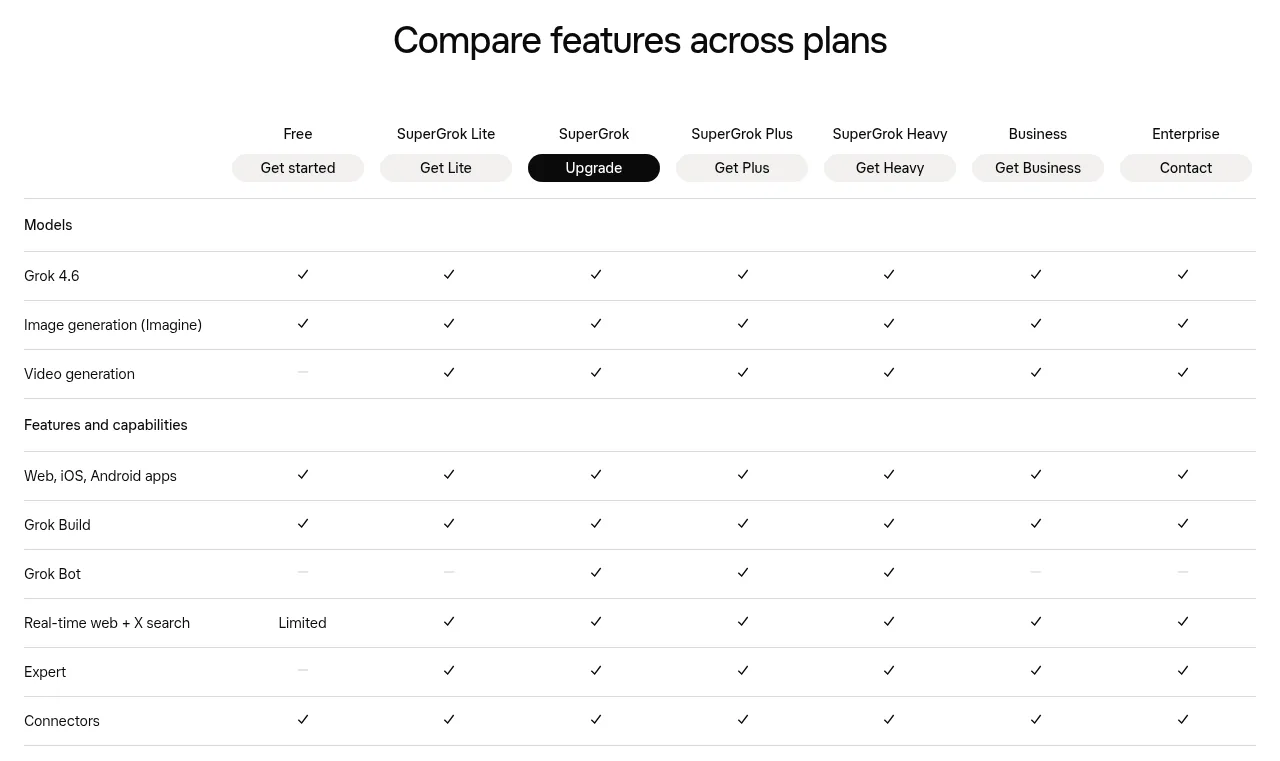
The table compares Free, SuperGrok and SuperGrok Plus at their published monthly prices. The full official feature comparison also includes SuperGrok Lite: it has Expert and video generation, but no Grok Bot.[6] Expert or video alone therefore does not require the $30 SuperGrok tier. Lite has no monthly price listed in the public pricing cards, so this table does not assign it a price.[6]
Paid Grok work draws from a shared weekly allowance. Chat, Imagine, Voice and Build consume that pool according to their compute use. Settings > Usage shows consumption and the reset time, so compare the actual workload rather than a fixed prompt count.[2]
Compare a subscription or top-up delivered to an account you own with the official upgrade offer. SpaceXAI’s consumer terms prohibit sharing credentials or making an account available to another person.[3]
View SuperGrok subscription optionsIs Grok Free enough?
Free includes Grok 4.6, Imagine image generation, Grok Build, web and mobile access, connectors, voice and limited web/X search.[5] It is a useful starting point for chat, documents and occasional images. If you need video generation, Expert or Grok Bot, compare the paid tier that includes that feature.
When is SuperGrok worth the upgrade?
SuperGrok provides Expert, Grok Bot, video generation and higher limits at the public $30 monthly price.[5] Grok Bot is a feature difference from Lite, which already includes Expert and video.[6] Access to Grok 4.6 or Imagine images alone is already available on Free.[5]
Use the extra tools for a specific job
For document work, attach a PDF or spreadsheet with the + button in a chat, then ask for an extracted table, chart explanation or comparison.[2] Use the free allowance first; a paid plan adds capacity for longer or more frequent work.[5]
Expert is included in Lite, SuperGrok and the higher individual tiers; Bot is absent from Lite and included from SuperGrok upward in the pricing comparison.[6] Bot runs on a persistent cloud computer with messaging, approvals, connectors and routines, which suits recurring information gathering and ongoing tasks.[2] Every paid individual Cursor plan and Cursor Teams also qualifies for Grok Bot, so an existing subscriber does not need a separate SuperGrok subscription just to obtain Bot access. Sign in to the Bot app with Cursor; if your access comes from SuperGrok, link that subscription when prompted.[7]
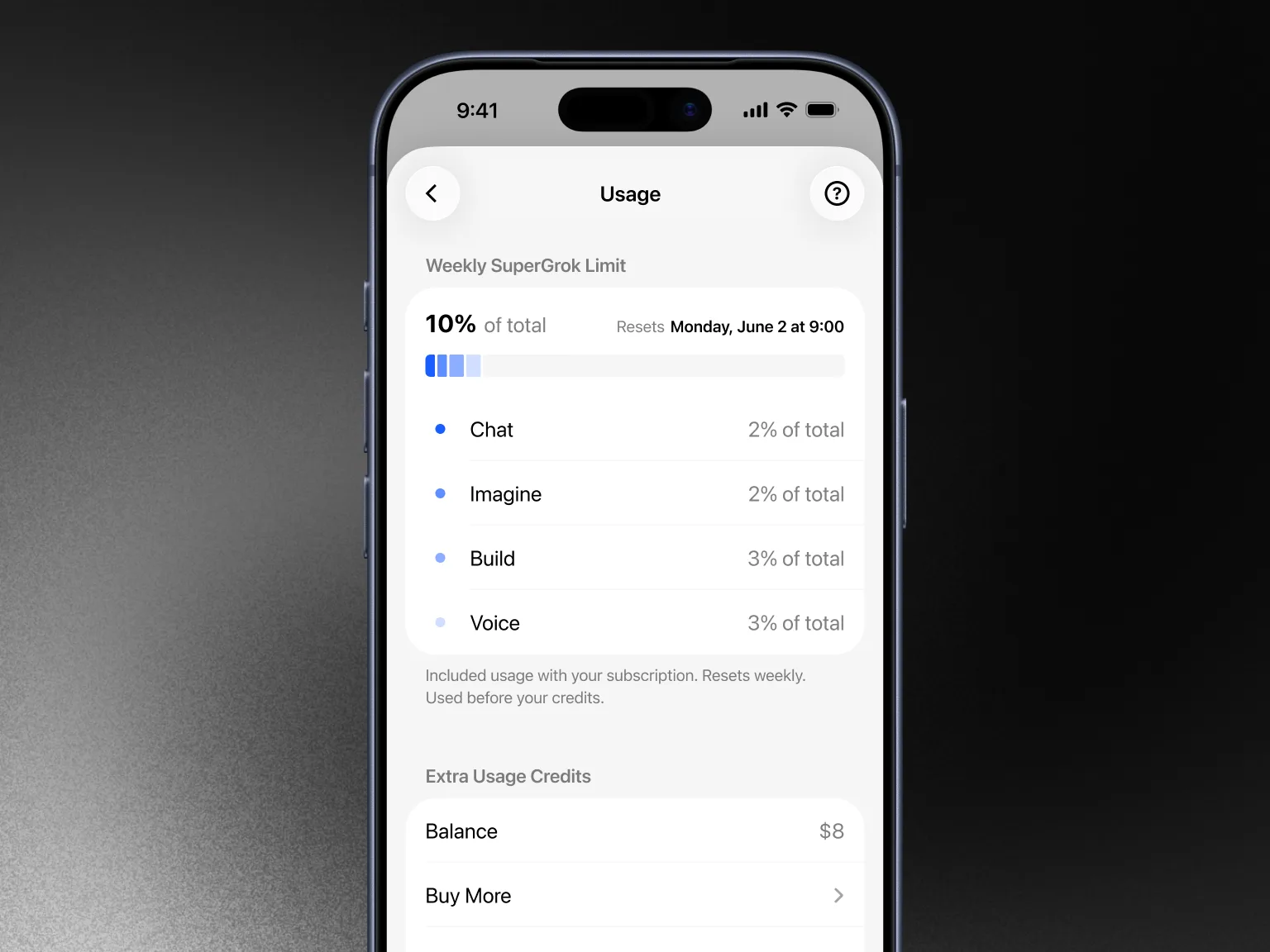
The Usage screen separates Chat, Imagine, Build and Voice within one weekly pool. High-quality video and long coding work can consume more compute than an ordinary message, so use the product breakdown and reset time to decide whether the current allowance fits.[2]
Consumer subscriptions and developer API billing are separate categories on the pricing page. Budget API usage through the API rates and billing flow.[5]
Who should consider SuperGrok Plus?
SuperGrok Plus includes the SuperGrok tools and adds 1080p video, significantly higher Chat/Imagine/Voice/Build usage, faster replies, peak-time priority and early feature access.[5] It fits work that already uses the SuperGrok toolset but needs more capacity or 1080p video.
If the weekly allowance is your only reason for comparing tiers, check the current Usage screen before upgrading.
Keep Free when Grok 4.6 chat and Imagine images fit within its available usage.[5] For Expert or video without Bot, Lite is also an option.[6] If you already pay for an individual Cursor plan or Cursor Teams, use that eligibility for Bot rather than buying SuperGrok just for access.[7] Otherwise, SuperGrok includes Bot and higher Grok usage; move to Plus when you need substantially more capacity or 1080p video.[5]
View SuperGrok subscription optionsSources
- Pricing: Compare Grok Plans | SpaceXAI
- FAQ — Grok Website and Apps | SpaceXAI Docs
- Terms of Service — Consumer | SpaceXAI
- Welcome to Grok | SpaceXAI Docs
- Grok pricing and complete model/capability comparison
- Grok pricing: complete feature matrix including SuperGrok Lite
- Grok Bot getting started: eligible Cursor and SuperGrok subscriptions