

How to check your SuperGrok weekly limit and reset time
Settings > Usage is available on Grok web and mobile. It shows a progress bar, the percentage used by each product, the weekly reset date and time, and any Extra Usage Credits balance.[1] That account-specific information is more useful than a prompt count reported by another subscriber.
- Confirm the signed-in account and the plan shown in its settings.
- Record the used percentage and the reset date and time exactly as displayed. Include the timezone if one appears.
- Note the percentages for API, Build, Chat, Imagine, and Voice.[1]
- Save the exact warning and the model, feature, or resolution selected when it appeared.
- Hide your name, email, and payment details before saving a screenshot for support.
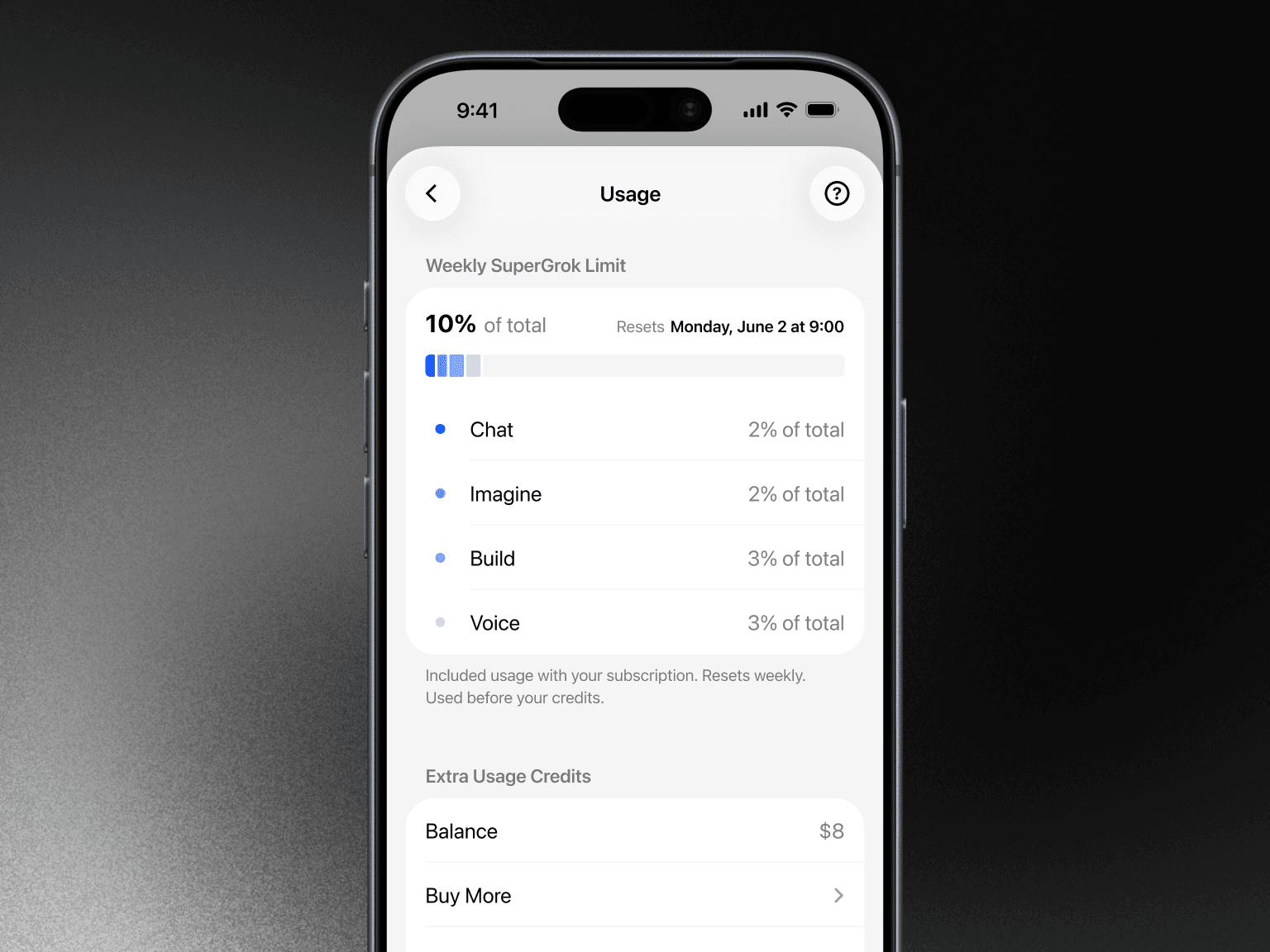
Keep the same login open while you check. A subscription belongs to the account used to buy it, so paid access may appear missing if you sign in through a different Apple, Google, email, or X account.[1] If the plan itself is absent, start with
Weekly limit, tool restriction, or missing subscription?
An exhausted weekly pool, a restriction on one tool, a temporary rate warning, and a missing subscription are different problems. Match the message on your screen to the relevant account evidence before deciding what to do.
| What you see | What to verify | Best next step |
|---|---|---|
| Weekly usage is 100% | The used percentage, product breakdown, and reset time in Settings > Usage.[1] | Wait if the reset arrives before the work is due. Otherwise, consider offered Extra Usage Credits or an eligible higher tier.[1] |
| One product used most of the pool | Its product percentage and the tasks completed with it.[1] | Reschedule or reduce that work if practical. Compare a higher tier only if the offer gives that product more usage. |
| Usage remains, but one model or tool fails | The exact model, tool, platform, and warning text. | Wait only if the warning identifies exhausted usage. Buy credits or change tiers only when the purchase screen or tier terms cover the named restriction. |
| The account says Free or asks you to subscribe | The receipt owner, original sign-in method, and active subscription record.[1] | Match the receipt to the correct login. A reset won’t restore a missing entitlement, and you shouldn’t add credits to the wrong account. |
| A credit balance appears but looks wrong | The balance, weekly-pool status, and recorded deductions in Usage.[1] | Don’t buy more until you understand the existing balance. Contact support through Grok or grok.com.[1] |
What uses the weekly pool?
Grok reports the pool as a percentage and breaks usage down by product.[1] A chat message generally requires less computing than high-quality video generation or a long coding task.[1] Because the FAQ doesn’t publish a fixed conversion from each action to a percentage, someone else’s message count can’t tell you how many images, videos, or Build tasks your account has left.
List the work you still need to finish and mark each task as Chat, Imagine, Voice, or Build. If the displayed percentage is detailed enough, note how an ordinary necessary task changes the total. Don’t use your allowance solely to run a test.
- Record the product and task type with each observation.
- Don’t use a short chat request to predict the cost of video generation or a long Build task.
- Treat small or rounded percentage changes cautiously.
- Use these observations to plan your own work, not as a promised quota for another account.
To decide whether paid access fits your recurring workload, compare these interruptions with
Should I wait for the reset?
Wait when the reset shown in Usage arrives before your next necessary task. Once the weekly limit is reached, paid features pause until reset, while separate free-tier limits remain available for Chat and Voice.[1] Any work that requires a paid feature may stay blocked until then.
Can Extra Usage Credits cover the shortfall?
Eligible accounts can currently buy Extra Usage Credits through the web Usage screen, not through a mobile in-app purchase.[1] They’re used after the included weekly allowance is exhausted and expire one year after purchase unless the offer says otherwise.[1] Before paying, check the amount, currency, tax, balance, and any automatic top-up settings.
Credits suit an occasional overage that can’t wait, but xAI says they cost more per action than usage included with a subscription.[1] A credit balance also doesn’t prove that a separate restriction involving a model, resolution, platform, or account entitlement will change.
When does a higher tier make more sense?
Consider a higher official tier when necessary work repeatedly exhausts the pool. On 29 August 2026, xAI described SuperGrok Plus as providing significantly higher usage across Chat, Imagine, Voice, and Build.[2] Its usage FAQ says a higher plan provides more weekly usage at a lower cost per action than repeatedly buying credits.[1] Higher tiers still have usage limits, so check the signed-in offer against the product causing your shortfall.
If you also use X, treat that as a separate subscription decision. The consumer terms for grok.com and its apps don’t govern paid Grok access through X.[3] See
When should I avoid another purchase?
- Don’t buy credits when the paid plan itself is missing.
- Don’t assume every unavailable model or tool is blocked by weekly usage.
- Don’t use an xAI API console balance to diagnose a consumer subscription warning.
- Don’t change accounts halfway through the check.
- Don’t enable automatic top-up without checking its amount and monthly cap; xAI says you choose both.[1]
If the paid status, Usage data, or credit balance conflicts with the correct receipt and login, contact support through Grok or grok.com instead of adding capacity.[1]
Before paying for more SuperGrok usage
- Make sure the offer is a subscription tier, not a claim to sell official Extra Usage Credits.
- Check the exact tier, billing period, currency, tax, renewal terms, and billing owner.
- Confirm that the offer changes the allowance or feature named in your Usage warning.
- Use only an option delivered to an account you control. xAI’s consumer terms prohibit sharing credentials or making an account available to another person.[3]
- Reject shared logins, transferred accounts, and any delivery method that requires your password or sign-in code.
- Keep waiting for the reset and staying on your current tier among your choices. A restriction doesn’t automatically make another purchase worthwhile.
If your account evidence shows that an eligible subscription tier would address a recurring shortfall, G2G is one place to compare currently listed options and their conditions. Compare the delivery method and listing terms, and consider only an option applied to an account you control.
Wait when the displayed reset arrives before the work is due. Buy credits only for an eligible one-time shortfall that cannot wait, and consider a higher tier only when the same necessary workload repeatedly exhausts the weekly pool. If the paid plan or Usage record is wrong, fix the account first.