Stay on CapCut Free if it completes the videos you regularly publish. Pro becomes worth considering when the same locked feature repeatedly blocks a required result or creates enough extra work to matter. The useful question is not how many tools Pro includes, but whether one of those tools fixes a problem you actually encounter.
Where the free plan stops
Complete a normal edit before browsing premium features. Add the subtitles, media and effects you usually need, then export at the required settings. CapCut says purchase prompts can appear for premium templates, effects, AI tools, expanded cloud storage and certain 4K, 60 fps or watermark-related export choices.3 Services can differ by device and jurisdiction, so the prompt on the account and platform you intend to use is the relevant one.1
| Editing job | What Free must complete | Pro difference worth checking | What could make Pro useful | When to stay Free |
|---|---|---|---|---|
| Occasional social clips | A finished export that meets the publishing brief | The exact effect, template, AI tool or export choice currently marked Pro.3 | A required locked element appears in recurring projects | Available tools and simple substitutions already produce the intended result |
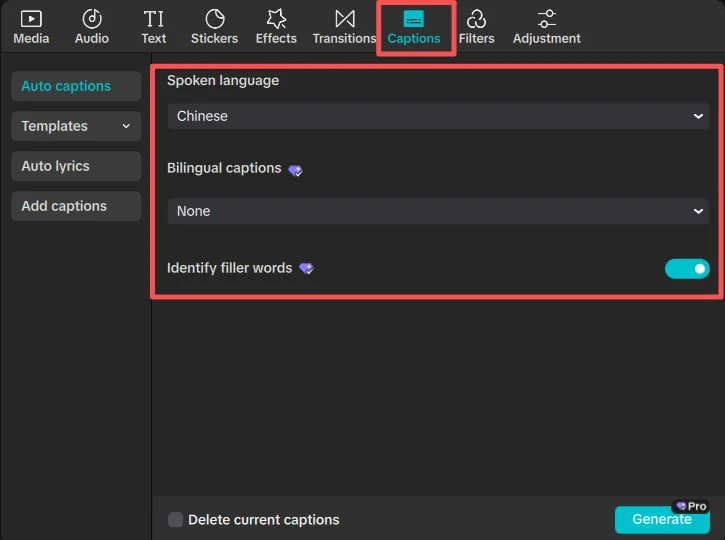
| Subtitle-heavy videos | Accurate, editable subtitles with acceptable correction and styling time | Any paid AI or styling function named in the signed-in offer | The function removes repeated correction or formatting work | Manual correction remains quick or the paid result still needs similar repair |
| Background removal | Clean edges on the footage you normally use | The specific removal tool and any displayed usage allowance | It reliably avoids substantial frame-by-frame repair | A free method or another editor produces an acceptable cutout |
| Premium assets and templates | A publishable project using available or owned media | Access to the exact premium material currently needed.3 | Replacing assets repeatedly disrupts real work | Owned or free assets fit the project with little extra effort |
| Client export requirements | The required resolution, frame rate and watermark condition | The locked export choice shown for the delivery device.3 | Free cannot produce a confirmed delivery requirement | The client or platform accepts the Free output |
| Repeated branded edits | Reusable titles, layouts and brand elements across several projects | A paid tool or material that removes the same repeated task | The saved work recurs throughout the billing period | A reusable Free project keeps production manageable |
| Phone and computer editing | A disposable project moved through the intended device sequence | Pro benefits across mobile, desktop and web on up to five devices at once.4 | Manual transfer or rebuilding regularly interrupts work | Local backups and manual transfer remain dependable |
A locked tool is not enough reason to pay
A premium label proves only that the item is outside your current access. It does not prove that the item will improve a finished video or save meaningful time. Upgrade only when the problem occurs in confirmed work, the offered plan includes the exact solution, and a free substitute would be materially more disruptive.
To compare the cost with actual use, divide the complete local charge for one billing period by the number of projects you realistically expect to finish in that period. Compare that cost per project with the time or replacement expense the paid feature would avoid. Use your own checkout amount because CapCut says pricing varies by region, device and available promotion.2
Read the complete CapCut checkout terms and local costWhat can make Pro poor value
- The project that prompted the upgrade may end while recurring billing continues. An automatically renewing subscription renews unless it is cancelled through the applicable Apple, Google or CapCut account before the current period ends.1
- Features, plans and prices can change under CapCut’s terms and applicable law.1
- A paid AI tool may still show a usage or credit allowance. Read the amount displayed for the offered plan before relying on it for repeated production.
- Premium assets are useful only when they fit your work and their license permits the intended publication. CapCut says commercial use depends on the applicable materials agreement and an express “Commercial Use” label.16
- Cloud capacity depends on the relevant plan and can be suspended after the subscription or storage package expires.1 Keep independent copies of important media and projects.
- Older projects may be harder to revise after downgrading if they depend on paid materials that must be replaced.
Read the signed-in purchase screen
CapCut directs subscribers to the relevant purchase page for the detailed Premium Service description because service versions and availability can differ by device and jurisdiction.1 Before paying, match that page to the project that exposed the limitation.
- Confirm that the exact feature, asset, export choice, storage amount or usage allowance is included.
- Record the price, currency, tax treatment, billing interval, amount due now and renewal terms. CapCut does not publish one fixed Pro price for every buyer.2
- Identify whether Apple, Google or CapCut will manage renewal and cancellation.1
- Confirm the supported region, device, app version and CapCut login method.
- If a trial appears, read its eligibility, duration, conversion date and cancellation conditions.
- Check refund rules before using paid features. CapCut’s general terms describe a 14-calendar-day full-refund period only when the Premium Service has not been used; store rules and applicable law can also affect the result.1
- For client or brand work, inspect the usage label and applicable license for every supplied material.16
If the offer matches the project and the subscription will remain attached to an account you control, G2G can be one place to compare currently listed CapCut-related purchase options.
Compare CapCut Pro purchase optionsWho should stay on Free
Stay on Free when normal projects export acceptably, locked items are optional, or substitutes add little work. It is also the better choice when editing is irregular: a tool used for one experimental project does not establish enough recurring value to support another bill. Reconsider when the same limitation begins affecting real deadlines or required deliverables.
Who should consider Pro
Consider Pro when you can name the recurring blocker, the signed-in offer includes the exact capability that removes it, and the benefit exceeds the complete local cost. Frequent subtitle repair, repeated asset replacement, a required export choice or disruptive movement between devices can support an upgrade when the improvement survives a representative-project test.
Who should wait before subscribing
Wait when the feature appears on another platform but not yours, the allowance is missing, the asset license is unclear, or the checkout terms differ from what you expected. Waiting also makes sense when the paid result still needs nearly as much manual repair as the free approach.
Check who controls a CapCut Pro account before buying access| Choice | Who it fits | Main benefit | Material drawback | Choose differently when |
|---|---|---|---|---|
| Stay on Free | Creators whose normal edits and exports meet their requirements | No recurring subscription charge | Some substitutions or manual work may remain | A paid restriction repeatedly blocks confirmed work |
| Subscribe on your own account | Creators with a recurring blocker and a currently included Pro solution | Removes a measured interruption from regular work | Recurring billing plus possible changes to features, assets or limits.1 | The benefit is occasional, unclear or inexpensive to replace |
| Wait and verify | Creators facing uncertainty about platform support, licensing, allowances or checkout terms | Avoids paying for a plan that may not solve the project | The desired capability remains unavailable during the check | The purchase screen resolves the uncertainty and a project test supports upgrading |
Finish with one real project on Free. If a specific limitation changes the result or creates substantial repeat work, confirm that the signed-in Pro offer removes that same limitation. If it does and the drawbacks remain acceptable, comparing purchase options is reasonable.
Review CapCut Pro options for your workflowSources
- CapCut Terms of Service — Service Plans, Renewal, Cancellation and Refund
- How Much Does CapCut Pro Cost?
- Why Am I Prompted to Purchase CapCut Pro?
- Can I Use CapCut Subscription Membership on Multiple Devices Simultaneously?
- How to Sign In on Another Device With the Same Account
- CapCut Trust Center — Legal Protections and Commercial-Use Materials
